Malcolm Keith 2026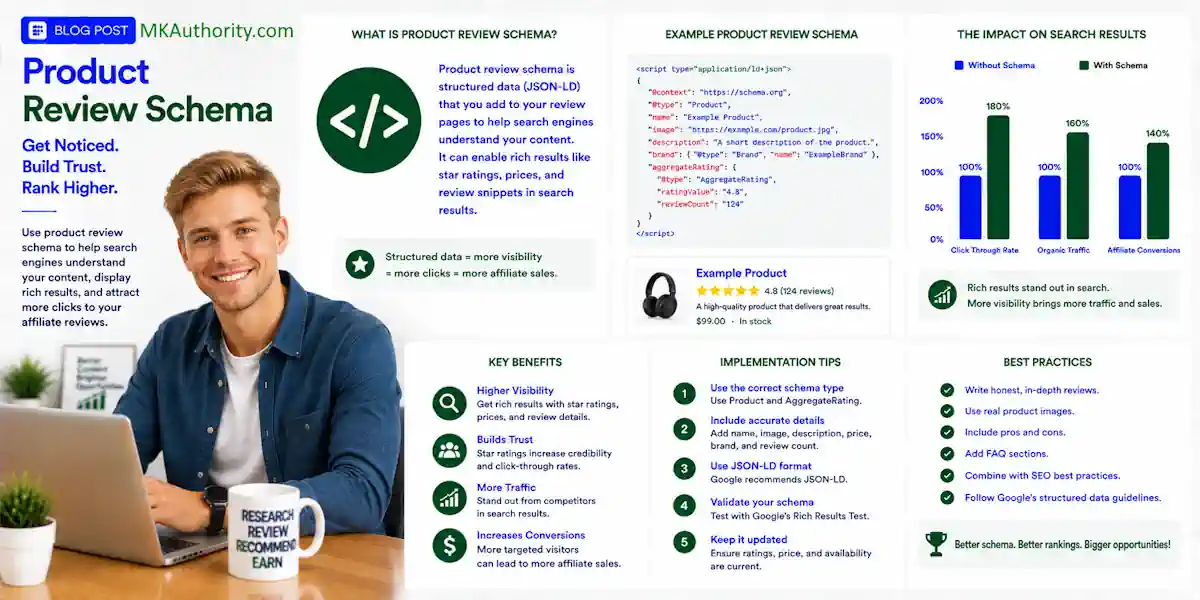

A great affiliate review can get attention, build trust, and send buyers through your links. But if Google cannot clearly understand what product you reviewed, your hard work may blend into a plain blue search result. We can use product review schema – a form of structured data markup – to help with this.
Product review schema is a structured data markup language (typically written in JSON-LD). It gives search engines context about the product, rating, review, prices associated with a product, and availability.
When implemented correctly, a product review schema allows search engines like Google to display rich snippets—such as gold star ratings, review counts, and pricing—directly on the search engine results pages (SERPs). However, it may make your page eligible for rich results or rich snippets, but it can’t guarantee star ratings, seller ratings, rankings, or a particular appearance in search results.
Get the page right first. Then add review schema that communicates the same honest story.
Key Takeaways On Implementing a Product Review Schema
- Product review schema helps Google understand a reviewed product, rating, price, availability, and other details, but it cannot guarantee rich snippets, star ratings, or seller ratings.
- Use individual
Reviewmarkup for one clearly identified editorial opinion, and useAggregateRatingonly when you collect genuine ratings or reviews from your own users. - Every schema value should match content visitors can see, including the product name, rating, author, review date, review text, price, and review counts.
- Choose one reliable source of Product and Review schema per WordPress page to avoid duplicate entities and conflicting markup from plugins, themes, or WooCommerce.
- Test live pages with Google’s Rich Results Test, the Schema Markup Validator, and Search Console, then keep product details and affiliate offers current.
What Product Review Schema Does for Affiliate Pages

Schema markup is code that labels the entities and properties on a page in a format search engines can read. It doesn’t replace your review copy. Think of schema markup as the label on a filing cabinet. The review is still inside the folder, but the label helps Google understand what it’s looking at.
Google may use product schema to create rich snippets in search results. A product listing may show a rating, review count, price, availability, or other product information.
Google’s structured data introduction explains the structured data guidelines clearly. Markup helps Google understand content, but it doesn’t force Google to show a rich result.
For an affiliate site, this matters because your page usually helps people research before buying. The visitor clicks from Google, reads your review, and then visits the merchant through your affiliate link.
That’s a normal editorial review flow, not a merchant store page that processes the sale itself. Organic product markup also shouldn’t be confused with seller ratings. They’re a separate search or advertising feature, and adding review schema alone doesn’t create them.
If visitors cannot see the same rating, count, and review details on the page, they should not appear in your markup either.
Choose Between an Individual Review and Aggregate Rating
The most common mistake is adding every review field because a plugin dashboard displays them. Start with the information you genuinely have.
Use individual Review markup for one named opinion
An individual Review describes one person’s written assessment of a particular product. On an affiliate review, this can be your editorial opinion if you clearly present it as your own review.
The review should point to a real product. It should include the reviewer name, review text, date, and review rating if you use a numbered score.
For example, if you write a full review of an email marketing tool after testing its features, support, pricing, and limits, your page may contain one editorial review. Your visible byline and published date should match the structured data.
Don’t present your single editorial opinion as independently collected customer reviews. You’re the publisher and reviewer, not a collection of buyers.
Use AggregateRating only for real collected feedback
AggregateRating represents an aggregate rating based on multiple genuine ratings or reviews. It isn’t a fancy way to turn one personal opinion into “4.8 stars from 63 users.”
According to Schema.org’s AggregateRating definition, the rating must come from a group of ratings or reviews. It should describe feedback about the product, not seller ratings imported from another platform.
reviewCountis the review count, meaning the number of written reviews.ratingCountis the rating count, meaning the total number of ratings, including ratings without written comments.ratingValueprovides the rating value, which is the average score.bestRatingandworstRatingexplain your scoring scale.
If you don’t collect independent feedback on your own site, don’t invent one. One honest editorial review is far better than fake social proof.
Build Product Markup Around the Actual Item
Your product schema should center on a Product entity. The review belongs inside it because the product is what the page is about. Google says a product snippet needs at least one of these properties: review, aggregateRating, or offers.
Read Google’s current Product snippet requirements before you publish a large batch of review pages. It explains the supported fields for schema markup and the difference between eligibility and actual display.
Name, image, brand, and description must agree
The product name in your schema should match your review headline. If the post is called “RightBlogger Review 2026,” do not mark up a vague item called “AI Writing Software.”
Use the exact product name shown on the page. Add the brand when you know it. Use the same product image visitors see. Keep the description short and based on your actual review.
A clean Product entity often includes these schema properties:
- The product
nameshown in your title or comparison box. - An
imagethat is visible on the page and relevant to the item. - The
brand, when it is known and accurate. - A short
descriptionthat matches your on-page summary. - A nested
revieworaggregateRatingwhen you have legitimate data.
Affiliate publishers should be careful with offers. Product schema and offers data don’t generate seller ratings. Only mark up a merchant’s current price, sale price, availability, or stock status when it’s visibly shown on your page and you can keep it current. A stale “$49 one-time price” in schema can create a mess when the vendor changes the offer tomorrow.
A Simple JSON-LD Review Example
JSON-LD is usually the easiest format for WordPress because a schema plugin or custom template can add it. Google supports other formats, but this approach keeps markup separate from the visible page layout; Schema.org syntax and Google’s supported features aren’t identical.
Here is the basic structure for a single editorial review with a nested review inside Product. The following JSON-LD uses sample values, so replace each one with details that appear on your live page before publishing:
{"@context":"https://schema.org","@type":"Product","name":"Product name shown in the review headline","review":{"@type":"Review","author":{"@type":"Person","name":"Reviewer name shown in the byline"},"datePublished":"2026-08-28","reviewBody":"A review summary that visitors can read on the page.","reviewRating":{"@type":"Rating","ratingValue":"4","bestRating":"5","worstRating":"1"}}}
This review schema identifies one named person who wrote one review and awarded a four-out-of-five rating. The rating value belongs to that reviewer, not to an aggregate rating calculated from customers. It does not claim that four is a customer average or create seller ratings.
If you collect genuine ratings from your own users, the aggregate data follows this shape:
"aggregateRating":{"@type":"AggregateRating","ratingValue":"4.6","reviewCount":"27","ratingCount":"34","bestRating":"5","worstRating":"1"}
The review count is 27, while the rating count is 34; both values must come from a real source. If someone deletes a review, changes a score, or your form gets spammed, update the visible totals and markup together.
Google’s review snippet documentation is the best reference when you’re unsure whether to nest a review, use itemReviewed, or include aggregate data.
Match Every Markup Value to Visible Content
This is where many WordPress affiliate sites go wrong. The schema markup can be valid, and the test tool can look happy. Yet the page shows a different price, rating, or product name.
Google wants structured data to represent the page users can actually see.
| Markup field | What visitors should see |
|---|---|
name | The same product name in the headline or review box |
ratingValue | The same review rating shown beside your editorial verdict |
reviewCount | The actual review count from visible written reviews |
ratingCount | The real visible rating total, if different |
author | The reviewer name in the byline or review area |
datePublished | The visible original publication date |
reviewBody | A real sentence or summary from the page |
Keep pros and cons on the page
Google can show pros and cons for qualifying editorial product review pages. The catch is simple: readers must be able to see those pros and cons.
Don’t hide them in a tab that never loads. Don’t add generic phrases like “great quality” and “worth buying” to code while showing nothing useful in the article.
A proper review box might list a real strength, such as a tool’s built-in keyword workflow, and a real limitation, such as a feature locked behind a higher plan. That is helpful content. Empty praise is not.
Update changed prices and product details
Affiliate offers change fast. Bonuses disappear. Lifetime deals close. Monthly plans rise. A WordPress post written six months ago can still get traffic while showing details that are no longer true.
Changing a visible rating or price doesn’t control seller ratings or excuse stale affiliate data.
Set a reminder to check your important review pages monthly. Update the visible page first, then check the schema generated by your plugin.
The same idea applies to your RightBlogger AI content tool review. Content tools can help you get a first draft moving, but the final review still needs your real experience, current facts, and honest verdict.
Add Schema to WordPress Without Creating Conflicts

You don’t need to be a developer to use product review schema on WordPress. Still, you need one clear process. Many plugins generate schema markup automatically, while random pasting can create duplicate Product entities and conflicting ratings.
Pick one source of schema per page
Many WordPress schema plugins can output basic schema automatically, but valid code doesn’t make them authoritative. A dedicated review plugin or schema builder may also create Product and Review markup. WooCommerce extensions and themes may add product data too.
Before adding anything new, inspect what is already there. Rank Math, Yoast, review plugins, WooCommerce, and themes can all produce schema markup. If several tools output product schema, Google may receive duplicate Product entities and conflicting ratings.
Pick one tool as the source for each review page. Plugins can generate Product and Review markup, but they can’t manufacture seller ratings or legitimate user feedback. Then disable duplicate schema types in the others where possible.
If you use an automated tool such as 1C Review Builder for affiliate marketers, treat the output as a draft. Check every product claim, rating, pro, con, and affiliate disclosure before it goes live.
Use custom fields when your site grows
A handful of reviews can be updated by hand. One hundred reviews need a better system.
Use consistent WordPress custom fields for product name, brand, score, publication date, affiliate link, price note, affiliate disclosure, and review status. Then have your schema plugin or template pull from those same fields.
That keeps the review box and JSON-LD tied to one source. You avoid changing a rating in the post while leaving an old number buried in the code.
Affiliate Review Rules That Can Stop Rich Results
Affiliate marketing works best when your readers know where you stand. Make your affiliate disclosure clear. Explain what you tested. Say when you couldn’t verify a claim. That honesty also keeps your schema safer.
Never manufacture reviews or ratings
Do not create five-star customer reviews for a product you have never used. Do not scrape testimonials from a vendor sales page and present them as feedback collected by your site.
Also, do not aggregate ratings from Trustpilot, Amazon, G2, Facebook, or another website into your own AggregateRating markup. Those reviews belong to those platforms, and you do not control their accuracy or ongoing changes.
A vendor may display amazing testimonials, but seller ratings differ from a product review and its organic review snippet. You can discuss those testimonials as part of your research, with proper context. You cannot relabel a visible editorial review rating as customer feedback or present affiliate markup as a source of seller ratings.
Self-serving stars have limits
Google does not show a review snippet for self-serving reviews on LocalBusiness and Organization pages when the entity controls those reviews. Local business schema has the same restriction. A third-party widget doesn’t fix it when the business still displays reviews about itself.
That rule matters if your affiliate site also promotes your own coaching, local service, network marketing team, or business opportunity. Don’t expect to add stars to your own Organization markup and get stars displayed in search.
Google’s general structured data policies also prohibit misleading, hidden, and irrelevant markup. These structured data guidelines are clear: say what’s true, show it to visitors, and mark up only that content. Misleading markup can cause loss of eligibility and, in serious cases, a manual action.
Test the Markup Before Google Finds the Problem
Structured data markup can fail quietly for months. A missing brace can break the whole object. A plugin update can add duplicate schema markup properties. A changed review score can leave your code behind.
Run both validation checks
Start with Google’s rich results test. It checks whether Google can read your page and whether the markup may qualify for Google Search features. It can also show whether a review snippet or star ratings may be eligible in search results.
Then use the Schema Markup Validator as a schema markup validator for a broader Schema.org check. It may flag details that don’t affect Google eligibility, but it can still help you spot a bad property or broken nesting.
Together with the live-URL check below, these tools create a practical structured data testing workflow. Rerun the rich results test and the validator after major edits, plugin changes, theme changes, and template updates.
Check the live URL in Search Console
A pasted code test is useful, but your live WordPress URL is what matters. Cache plugins, CDN settings, JavaScript, and page builders can change what Google receives.
Use URL Inspection in google search console after publishing. Check the indexed version, request a recrawl if needed, and watch for product or review enhancement warnings.
Don’t panic over every non-critical warning. Fix errors first. Then work through warnings that improve data quality.
A valid test result is encouraging. It is not a promise that Google will show either feature or seller ratings.
Measure Clicks, Trust, and Affiliate Earnings Separately

Search Console CTR, or your organic click through rate, may rise when your page stands out, but it isn’t the finish line.
Product visibility and search enhancements are only one part of a broader commercial-content strategy, where ecommerce seo plays a supporting role. A dramatic title can get clicks from people who never read, opt in, or buy.
Track Search Console CTR separately from your outbound affiliate-link clicks. Then track conversions, leads, sales, refunds, reversals, and cleared commissions.
Don’t treat seller ratings as a proxy for affiliate earnings or product-page conversion performance.
The number that keeps paid traffic decisions grounded is expected earnings per click:
Expected EPC = sales conversion rate x commission per sale x (1 – refund and reversal reserve)
Say a product pays $35 per sale. Your review sends visitors at a 2% sales conversion rate. You keep back 20% for refunds and reversals.
Your rough payable EPC is $0.56.
That doesn’t mean you should happily pay $0.56 per click for traffic. Hosting, email tools, tracking, content costs, and profit still need room. But it tells you whether the offer and review page have a chance of working.
Good schema may improve how your page appears. Good content earns trust, and offer quality drives sales. Together, they give your affiliate business a better chance to produce sales over time.
Frequently Asked Questions
Can an affiliate review use Product and Review schema?
Yes. An affiliate page can use Product markup with a nested individual Review when it contains a genuine editorial assessment from a named reviewer. The marked-up product, author, rating, and review details must match the visible content on the page.
Can I use AggregateRating for a single review?
No. AggregateRating represents feedback from multiple genuine ratings or reviews, not one publisher’s personal score. If you only wrote one review, use individual Review markup instead of presenting your opinion as customer feedback.
Does product review schema guarantee star ratings in Google?
No. Structured data can make a page eligible for a rich result, but Google decides whether to show stars, review details, price, or other enhancements. Valid markup is not a guarantee of a particular search appearance or seller ratings.
What should the schema rating and review count match?
The ratingValue, reviewCount, and ratingCount should match the ratings and reviews visitors can see on the page. Do not import or combine ratings from platforms such as Amazon, Trustpilot, or G2 as if they were collected by your own site.
How do I avoid schema conflicts on WordPress?
Inspect the markup already generated by your SEO plugin, review plugin, theme, and WooCommerce before adding another schema tool. Use one clear source for each review page, then validate the live URL after major content, plugin, theme, or template changes.
Final Thoughts On Using a Product Review Schema
Review markup works when it supports a real review, not when it dresses up thin affiliate content with borrowed stars.
Use one clear Product entity and mark up only visible facts. Choose individual review data or an aggregate rating only when the review rating reflects the reviewer’s real assessment. Test every important page before you rely on it.
The strongest review pages don’t need fake proof. Give readers a straight answer, and don’t rewrite honest affiliate content to imitate seller ratings. Let the real value of the offer do the selling.