Malcolm Keith 2026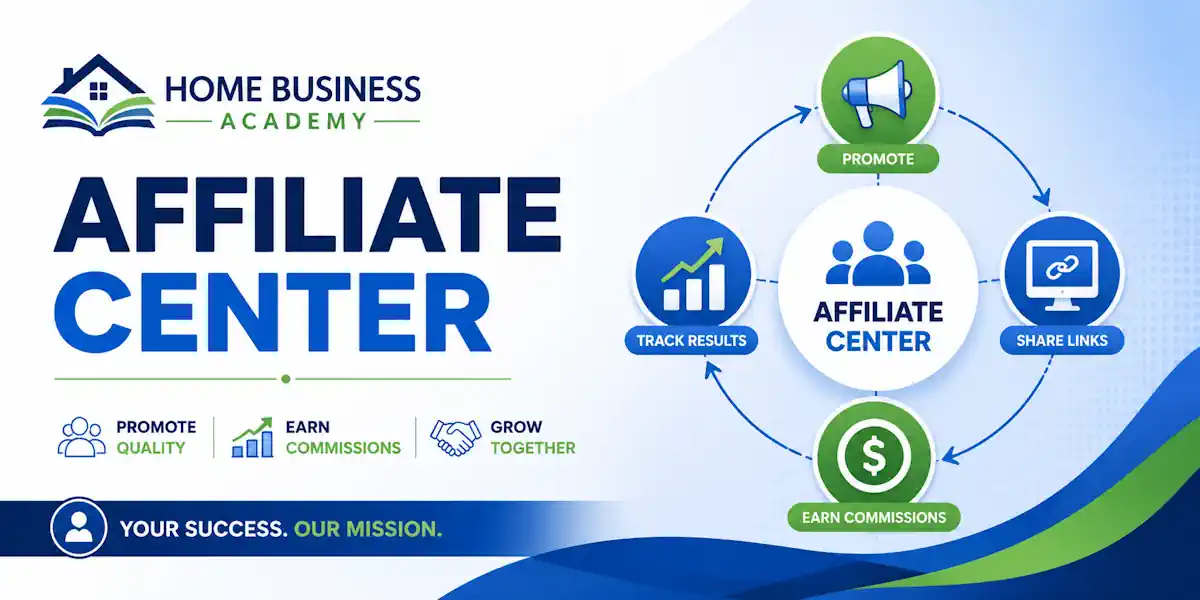

If you’re new to the Home Business Academy Center for members and affiliates, the main job is simple: find your links, check your stats, and get your account set up right. You don’t need every advanced feature on day one. You need the few tools that help you start promoting without second-guessing every step.
A fresh affiliate dashboard can feel like opening a toolbox with no labels. You know the important stuff is in there, but the first few clicks can still feel messy.
Not had a look at the Home Business Academy yet? See the new HBA updates in this post.
Pop your details in at https://PartnerWithMalcolm.com for more information

(If you want a quick outside snapshot of the company itself, ZoomInfo’s company overview gives you a plain business profile.)
Get your bearings inside the Home Business Academy Center
The Affiliate Center is where Home Business Academy members manage the components of the back office. It’s the place to follow all the training, grab links, look at funnels, track activity, and handle account details in one spot.
What you will see after logging in:

Inside the Home Business Academy (HBA) account, members get access to a suite of digital marketing tools, daily live coaching, and a financial literacy course designed to help build and manage online businesses or promote the HBA platform itself.
These have been continually overhauled and updated over the last ten years and taken onboard AI to help where possible. Your gateway to building a successful home business with multiple income streams. One of the biggest things most members mention is the community sprit and help that is offered.
✅ Let’s Goal – Personal development & goal tracking
✅ HBA Funnel Builder & Academy
✅ Premium Traffic & Conversion Academy
✅ Financial Literacy Academy
✅ Live coaching sessions & exclusive events
✅ 80% residual income affiliate program
1. LetsGoal
A very popular app many members are using and like a lot. It makes staying productive feel good.
🌅 Morning Routine System. Start every day with structure, purpose, and clarity. Follow a proven routine inspired by the habits of the world’s most successful people.
🙏 Gratitude + Meditation Tracker. Ground yourself in positivity and peace. Build a daily habit of gratitude and reflection to boost happiness and focus before the day begins.
🧠 Goal Planner & Vision Board. Set your goals, visualize your dream life, and stay on track with powerful digital tools that keep your vision front and center every day.
💪 Exercise & Reading Reminders. Stay strong in both body and mind. Gentle nudges help you move daily, learn continuously, and grow into your best self.
🤝 Supportive Growth Community: Join a network of like-minded achievers who inspire, encourage, and hold each other accountable to reach new heights together.
2. The HBA Funnel Builder
This is the core software of the platform. This super simple tool and training is everything you need to build, market, and automatically sell anything you want to online. It is is a drag-and-drop landing page and sales funnel tool created internally by the Home Business Academy. It is widely used by entrepreneurs, affiliates, and small business owners to generate leads, sell products, and host membership sites without needing advanced technical skills.
Compared with other similar products it is a giveaway price at $25 a month. Lots of training and directions.
Core Features
- Drag-and-Drop Editor: Highly customizable templates for opt-in pages, sales pages, checkout pages, and webinars.
- Built-In Booking Widget: Allows clients or leads to directly book appointments and consultations into your calendar.
- Membership Sites: Provides the ability to create secure digital courses, product stores, and gated content.
- Payment Integrations: Connects seamlessly with Stripe, PayPal, and other major gateways for processing transactions.
- Custom Domains & Tracking: Includes split-testing features and custom domain mapping to build a professional brand
- Custom Funnel Creation: Pre-built templates for lead capture, sales pages, and membership areas.
- Advanced Features: Built-in tools for scheduling appointments, building quiz funnels, setting up order bumps, and creating upsells.
- Affiliate Center: Tools to build and manage your own affiliate programs to sell custom products.
3. HBA Premium (Traffic & Conversions Academy)
This section of the home business academy center focuses on education and community support, including:
- Daily Live Masterminds: Monday-through-Friday Zoom sessions led by 7-figure marketers sharing actionable traffic and lead generation strategies (e.g., SEO, YouTube, TikTok, AI).
- Training Vault: A comprehensive library containing step-by-step training for getting traffic, writing copy, and mastering email marketing.
4. Financial Literacy and Tax Course
This educational product is designed to help entrepreneurs keep more of the money they earn. Leaning towards US environments it covers:
- DIY bookkeeping and tax reduction strategies.
- Methods for lowering overall tax liabilities for home-based businesses.
5. Community and App Features
- Member Network: A dedicated community feed and chat (accessible via desktop or a mobile app) that features live recognition notifications and social networking.
- Income Stream Settings: A dashboard area where users can input their affiliate links to third-party tools to earn passive commissions when referring new members.
- Affiliate Program: An 80% commission structure for users who choose to promote HBA’s software and training as an affiliate.
Join The Home Business Academy at PartnerWithMalcolm.com
These are general expectations for any platform back office center dashboard
After you sign in, expect a dashboard with a main menu, a stats area, and shortcuts to common tools. Most of what you need is grouped into sections like links, promotions, reports, and account settings. Think of it like a home base, not a puzzle.
The first screen usually tries to do two things at once. It shows you what has happened already, such as clicks or commissions, and it gives you places to go next. That’s helpful once you know the layout. Before that, it can feel like too much.
You’ll probably notice dashboard cards, tabs, or sidebar links first. Those are not there to impress you. They are there to move you to the few areas that matter most: your unique link, the pages you can send people to, and the reports that tell you whether anything is working.
Which parts matter most when you are just starting
When you’re brand new, don’t try to tour every corner of the platform. Start with the links section, the funnel or landing-page area, the reporting section, and the support or help resources. That’s enough to get moving.
Your first goal is not to learn every tab. Your first goal is to find the tools you’ll use this week.
That small shift matters. Beginners get stuck when they treat the dashboard like a class they have to pass. It’s better to treat it like a workbench. Open the drawer you need, use the tool, then come back for the next one.
Set up your affiliate account the right way
Before you promote anything, clean up your account settings. A missing payment detail or an old email address can turn a good first commission into a long support ticket.
Complete your profile and payment details
Start with the basics. Check your name, email address, username, and any required payout information. If the platform asks for tax details or identity verification, do that early. Waiting until after you make a sale is the slow way to learn.
Make sure everything matches the records you actually use. One typo in an email address can keep you from seeing alerts. One wrong payment field can delay a payout you were counting on.
This is also a good time to look at your affiliate profile page with fresh eyes. If anything looks incomplete, fix it now. If you’re still comparing notes before you put serious time into the platform, this user review roundup can add a little outside context.
Check your access, permissions, and notifications inside the Home Business Academy center.
Next, confirm that you can open the tools you expect to use. If you can’t see links, funnels, reports, or promo assets, don’t assume you’re missing something obvious. Sometimes it’s an access issue, not a user issue.
Turn on account emails or notifications if those options are available. You want to know about payout updates, login issues, and account changes without having to guess. A simple inbox folder for affiliate emails can save you time later, especially once clicks and signups start coming in.
Find your affiliate links, funnels, and promo tools
This is the part most beginners care about, and for good reason. If you can’t find the right link or page, nothing else matters.
Grab your affiliate link and understand where it sends people
Your affiliate link is the tracking link tied to your account. When someone clicks it and later buys through the approved path, that link tells the system the referral came from you.
Always test it before you share it. Open it in a private browser window and click through like a regular visitor. Does it load the right page? Does it feel clean on mobile? If the answer is no, fix that first.
A raw affiliate link is the direct route. It sends people straight to a page with your tracking attached. That’s fine when the offer and the audience already match.
Use funnels and prebuilt pages to save time
Funnels are different. Instead of one jump straight to an offer, a funnel walks people through a simple sequence. That might include a capture page, a follow-up page, or a more guided sales page, depending on what’s available in the platform.
For beginners, prebuilt pages are a gift. You don’t have to build from scratch, write every headline, or guess at structure. You can focus on getting traffic and learning what message pulls interest.
This matters more than most people think. A basic system beats a fancy mess every time. If you want a bigger-picture look at keeping your setup simple, this piece on how to create an affiliate marketing system is worth a read.
Look for banners, emails, and other marketing assets
Many affiliate centers also include extra promo tools. You may find banners, email swipe copy, short blurbs, or social post ideas. These are starter materials, not rules.
Use them to save time, especially when you’re staring at a blank page. But don’t post everything word for word forever. The closer your message sounds to your own voice, the easier it is to build trust.
Track clicks, signups, and commissions with confidence
Numbers scare beginners because they look bigger than they are. Most of the time, you’re not doing high-level analysis. You’re answering a few simple questions.
Read your dashboard numbers the easy way
Start with clicks. Clicks tell you whether anyone is visiting through your links. If you have no clicks, the issue is traffic. If you have clicks but no signups or sales, the issue is usually the message, the audience, or the page.
Then look at signups or leads, if that metric appears in your dashboard. That shows whether people are taking the next step. After that, check commissions, including whether they are pending or paid if those labels are shown.
Don’t stare at one day of data and turn it into a big story. Early results are often thin. A small pattern over time tells you more than a single spike.
Spot which promotions are getting results
The real value of tracking is comparison.
- Which link got more clicks?
- Which funnel got more signups?
- Which traffic source brought people who stayed interested?
Change one thing at a time so you know what caused the result. If you switch the page, the audience, and the traffic source all at once, the numbers won’t teach you much.
This is where traffic choices matter. If you’re not sure how to think about your first traffic source, this guide on free traffic and paid ads for affiliate marketing lays out the trade-offs in plain English.
Avoid common beginner mistakes in the Affiliate Center
Most early mistakes are not dramatic. They’re small. But small mistakes can waste days.
Double-check links before you share them
Never assume a link is fine because it copied correctly. Test it on desktop and phone. Make sure it opens the intended page and doesn’t send people somewhere broken, generic, or confusing.
That matters for two reasons. First, bad links kill trust fast. Second, they can kill conversions before you even get a fair shot. Keep one simple document with your approved links so you’re not grabbing random versions from old notes or browser tabs.
Keep your setup simple until you know what works
New affiliates often try to run five ideas at once. One funnel from here, another link from there, two traffic sources, three messages, and no clear way to tell what did what. That’s how people stay busy and learn nothing.
Start smaller. Pick one offer, one funnel, and one traffic source. Let the numbers come in. Then adjust one part at a time.
A lot of the common mistakes to avoid in affiliate marketing come from doing too much, too early. Simple systems are easier to track, easier to fix, and easier to repeat when they work.
Your Next Step Inside the Home Business Academy Center
The Home Business Academy Center gets easier once you know where the core tools live. Your links, funnels, reports, and account settings do most of the heavy lifting.
The smart move is to keep it simple. Set up your account cleanly, test your main promotion link, pick one page to promote.
I recommend the Turnkey System page to capture leads rather than the main HBA page. Watch the numbers before you add more moving parts.
Log in, open the few sections that matter most, and make your first pass through the dashboard with a clear job for each click.
That’s how confusion turns into momentum.