 Malcolm Keith 2026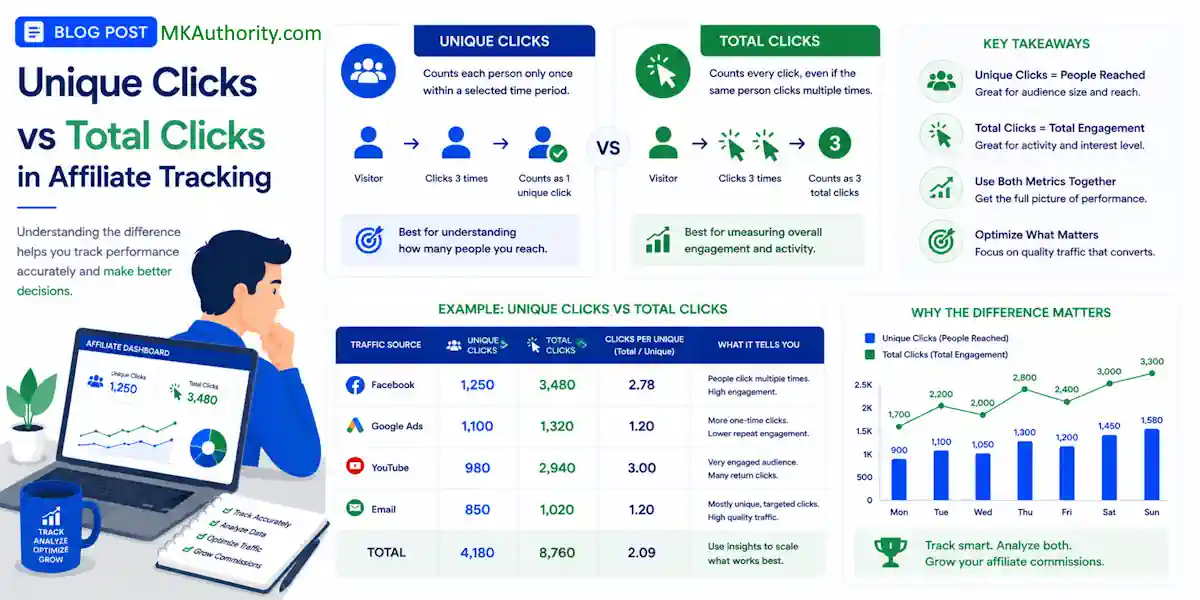

A click count can look strong and still tell you the wrong story. If you do not know the difference between unique clicks vs total clicks, you can easily misinterpret your data, scale a weak campaign, cut a good one, or blame the wrong page.
Unique clicks represent the number of distinct individuals who click a link, while total clicks count every single click instance, including repeat clicks from the same user. If one person clicks a link six times, it counts as 1 unique click and 6 total clicks.
In the world of digital marketing, these numbers often look similar on the surface, but they answer two very different questions regarding your audience behavior. Mastering these metrics is a fundamental part of performance tracking, as understanding the distinction is where effective affiliate management begins.
Key Takeaways On Unique Clicks vs Total Clicks
- Know the difference: Unique clicks represent the number of individual visitors who engage with your link, while total clicks count every single interaction, including repeat clicks from the same user.
- Use metrics for the right goals: Rely on unique clicks to calculate accurate conversion rates and reach, whereas total clicks provide insight into overall engagement and potential friction points in your funnel.
- Mind the reporting gap: Different tracking platforms use varying logic for identifying unique visitors, which is why your affiliate network, ad platform, and personal tracker rarely show identical numbers.
- Analyze the gap: A large discrepancy between total and unique clicks often indicates repeat visitors, which can signal high interest, or alternatively, technical issues like slow page load times causing users to click repeatedly.
What those click numbers actually mean

Think of your affiliate link like a store door. Unique clicks count how many people came through that door, while total clicks count how many times the door opened.
If you are running an email campaign, this distinction becomes even clearer. If a subscriber clicks your link three times, the tracking software typically records it as 1 unique click and 3 total clicks. In this context, unique clicks track individual recipients within your target audience, while total clicks account for all activity.
This is very similar to how email marketers analyze unique opens versus total opens to gauge subscriber engagement.
When comparing unique clicks vs total clicks, unique clicks provide a cleaner reach metric.
They answer the question of how many individual visitors were attracted to your link. Conversely, total clicks answer how much overall engagement happened.
This distinction is vital for analysis. If you want to know if a traffic source is bringing in fresh interest, unique clicks are the better starting point. If you want to see if people are returning to your content, total clicks reveal that behavioral pattern.
One important note is that unique does not always mean one real human forever. It means one visitor according to that specific platform’s counting rules, such as cookie tracking or IP address limitations. To better understand how your audience interacts with your links, you can look at the unique click rate, which helps clarify the efficiency of your traffic.
Here is the fast comparison.
| Metric | What It Counts | Best Used For | Where It Can Mislead |
|---|---|---|---|
| Unique Clicks | First counted click from a visitor, based on the platform’s rules | Estimating real reach, visitor-based conversion rates, traffic quality | One person may count twice across devices or different time windows |
| Total Clicks | Every recorded click | Measuring click activity, repeat interest, link placement response | Repeat clicks can make traffic look bigger than it is |
The short version is simple. Unique clicks tell you how many people you likely reached. Total clicks tell you how much clicking happened.

Why both metrics matter in affiliate reporting
A lot of beginners pick one number and run with it. That is where reporting gets sloppy.
Let’s say you send traffic to a landing page and your tracker shows 300 total clicks and 180 unique clicks. Then, the page generates 18 leads. If you divide leads by total clicks, your opt-in rate looks like 6 percent. If you divide leads by unique clicks, it looks like 10 percent. That is a significant gap in your conversion data. It is the same campaign, but it tells a different story.
For most landing page conversion decisions, unique clicks give you the cleaner read. A page converts individual visitors, not repeated taps from the same person.
Now, look at the other side. What if total clicks are much higher than unique clicks, but leads are flat? That does not always mean bad traffic. It can mean people are curious, lost, distracted, or clicking more than once because the page took too long to load. It can also happen when email subscribers reopen a message and click again later.
Factors like email deliverability play a role here, as they dictate how many people have the opportunity to interact with your link in the first place.
More total clicks with flat unique clicks usually means repeated action, not wider reach.
That is useful information. Repeated clicks can show genuine interest, but they can also indicate friction in your funnel.
Here is a practical example. You run a solo ad to an opt-in page for an affiliate offer. The campaign results come back like this:
- 220 unique clicks
- 360 total clicks
- 22 leads
- 2 sales
Your lead rate based on unique clicks is 10 percent. That is decent enough to keep testing. However, your total clicks are much higher, which hints that people hit the link more than once. Maybe the email copy got attention, the bridge page created curiosity, or the page flow felt clunky.
That means the right fix might not be to buy new traffic. It might be tightening the message, speeding up the page, or refining your call to action to make the next step more obvious.
If you are also watching your click-through rate from impressions to clicks, this affiliate link CTR overview helps connect the dots between traffic exposure and actual click behavior. And if you want a simple routine for tracking clicks, leads, and sales together, this proven affiliate marketing framework is a solid place to start.
Clicks matter. Still, clicks without context are like a speedometer with no map.
Why one dashboard never matches another
This part throws people off all the time.
Your ad platform says 250 clicks.
The tracker says 214.
Your affiliate network says 198.
So which number is right?
Sometimes, all of them.
Each system is watching a different part of the path. The ad platform may count the click on the ad itself. Your tracking reporting tool may count the redirected visit that reached your tracking link. The affiliate network may only count the click that made it all the way to the offer URL.
Then you add the counting rules, and the gap gets bigger.
One platform may treat unique clicks as one click per 24 hours. Another may count one unique per session. A third may split the same person into two visitors if they clicked once on mobile and once on desktop. When comparing these marketing metrics, it is vital to remember that each platform calculates total clicks and unique traffic according to its own logic.
Filtering changes things too. Some tools remove known bots or suspicious clicks. Others show raw numbers first and clean them later. Some affiliates also use pre-landers, rotators, or multiple redirects, which creates even more room for differences.
Slow pages can distort the picture as well. A user may click the ad but bounce before the final page fully loads. That click might appear in one report and never show in another.
This is why reading reports without reading definitions is a bad habit.
Don’t panic when platform A shows 220 clicks and platform B shows 187. The question is not which number feels better. The question is what each reporting tool is counting, when it counts it, and what it filters out.
If you are still choosing software, it helps to compare affiliate marketing tracking tools before you trust one analytics dashboard as the whole truth. Good tracking tools do not make the differences disappear. They make the differences easier to understand.
Which metric to prioritize when you’re optimizing
So which one should you focus on?
Use unique clicks first when you are judging reach and conversion quality. Use total clicks first when you are judging overall activity and repeat behavior. That is the golden rule for analyzing audience engagement.
Here are the situations where that rule helps most:
- When you are testing a landing page, unique clicks are the better base for calculating your opt-in rate and sales rate against industry benchmarks.
- When you are buying paid traffic, unique clicks usually give you the truer picture of your actual cost per visitor.
- When you are reviewing email broadcasts, total clicks can reveal repeat engagement from the same subscriber, while tracking clicks per unique opens provides a deeper look at list health.
- When you are testing button placement or link position on a page, total clicks can show which areas get more action.
- When you are trying to spot weak traffic, compare both metrics side by side instead of betting on one.
Now for the mistakes. These are the ones that cost money.
The first mistake is comparing unique clicks in one tool to total clicks in another. That is not apples to apples. It is apples to parking meters.
The second mistake is calling repeat clicks useless. They are not. Repeat clicks can show intent, confusion, or poor page flow. You need the surrounding data to know which one.
The third mistake is judging campaign quality from clicks alone. A high total click count with weak leads or sales can mean the offer-page match is off. A modest click count with strong conversion numbers can still be a winner.
The fourth mistake is ignoring the gap between unique clicks and total clicks. That gap tells a story. Sometimes it is harmless. Sometimes it is the clue that helps you fix the campaign.
If total clicks rise and unique clicks do not, you did not reach more people. You got more interaction from the same crowd.
When you are optimizing, ask a plain question before you stare at the dashboard: “Am I trying to measure people, or behavior?”
If the answer is people, lean on unique clicks. If the answer is behavior, total clicks deserve more attention.

Frequently Asked Questions About Unique Clicks vs Total Clicks
Why do my tracking tools show different click counts?
Each tracking system operates using its own specific logic for what constitutes a click and how it identifies a unique user. Factors such as cookie tracking, IP address limitations, bot filtering, and whether the tool tracks the ad click or the landing page redirect will cause numbers to vary between platforms.
Should I worry if my total clicks are much higher than my unique clicks?
Not necessarily, as this often indicates that individual visitors are interacting with your link multiple times. While this can suggest high engagement or interest, it can also point to issues such as a slow-loading page, confusing content, or a funnel that is difficult to navigate.
Which metric is better for measuring conversion rates?
Unique clicks are generally the preferred metric for conversion analysis because they represent actual individuals. Using unique clicks provides a more accurate picture of how your landing page is performing for new visitors without the distortion of repeat clicks from the same person.
Are repeat clicks ever useful to track?
Yes, repeat clicks provide valuable behavioral data that can help you troubleshoot your campaign. If a user is clicking your link multiple times without converting, it may signal that your messaging is unclear or that there is technical friction preventing them from completing the desired action.
Final Thoughts On Unique Clicks vs Total Clicks
The difference between unique clicks and total clicks might look small on a report, but it fundamentally changes how you interpret a campaign.
One number tells you how many people showed up, while the other tells you how many times your link was engaged. Understanding the distinction between unique clicks vs total clicks is essential for accurate performance tracking. When you know exactly which question you are asking, the right metric becomes obvious.
Effective affiliate marketing is not about simply chasing the highest volume. It is about interpreting your data correctly and making your next move with clear eyes based on the most reliable marketing metrics.