Malcolm Keith 2026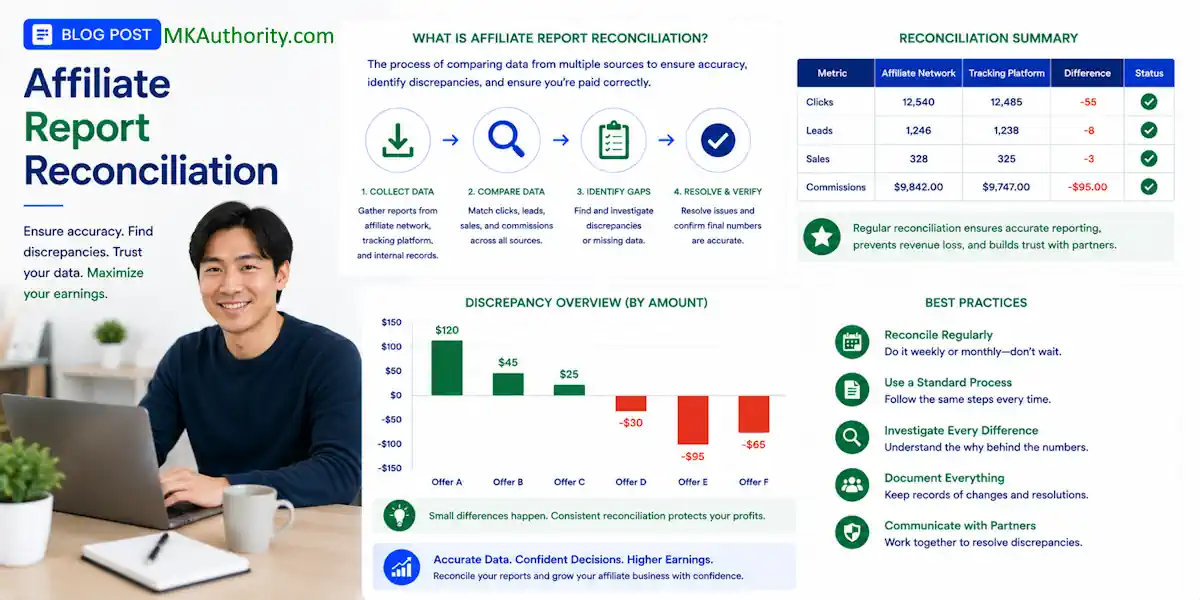

A tracker can show 100 conversions while your affiliate network shows 82 approved sales. That gap can feel like money disappearing into thin air. Don’t panic and don’t guess. Using affiliate report reconciliation is the process of matching affiliate network transaction data against your internal CRM or back-end sales logs to verify clicks, leads, and payouts.
It ensures that commissions paid align with actual fulfilled orders and account for cancellations or returns. Regularly performing affiliate report reconciliation is a vital step in maintaining accurate financial records for your business, as it ensures that no conversion is overlooked.
This affiliate report reconciliation process gives you a clear way to compare both sets of numbers, find the cause of discrepancies, and know when a problem needs attention.
The goal isn’t to make every dashboard match perfectly. The goal is to know which numbers pay you, which numbers help you optimize, and where the difference started.
Key Takeaways
- Affiliate network reports are usually the source of truth for payable commissions.
- Tracker data helps you optimize traffic and spot breaks in the funnel early.
- Always use a consistent record-matching process when comparing the same offer, date range, time zone, status, and currency to ensure data integrity.
- Calculate variance before escalating, because small gaps are normal in many campaigns.
- Bring click IDs, order details, and screenshots when you contact an affiliate manager.
Know What Each Report Is Actually Telling You
Before you compare numbers, get clear on what you are looking at. This simple step saves a ton of confusion.
An affiliate network report records transactions the advertiser or network has accepted into its system. These external records include clicks, leads, sales, commissions, reversals, refunds, chargebacks, and payment status. When a commission is approved and payable, the network report is generally the number that matters most.
This is where your actual affiliate income comes from. You can have a beautiful tracker report, but if the network does not credit the sale, you do not get paid for it.
Third-party tracker data comes from tools such as Voluum, RedTrack, ClickMagick, Binom, or a built-in tracker inside your traffic platform. Your internal records describe the visitor path based on the data received. It can tell you which ad, keyword, landing page, country, device, placement, or email produced a conversion.
This transaction activity must be verified against the network’s receipts to ensure your data remains accurate.
That makes tracker data great for decisions like these:
- Which paid ad is producing leads at a workable cost?
- Which landing page is losing visitors before the offer page?
- Which traffic source looks good at first, but produces no approved commissions?
- Which campaign needs more budget, and which one needs to go?
Think of the network as the cashier’s receipt. Think of your tracker as the security camera. Both are useful, but they do not do the same job.
Network reporting tells you what you can expect to be paid. Tracker reporting tells you what may be producing the result.
A sale can appear in your tracker first and later disappear from the network because of a refund, duplicate lead, failed payment, or fraud review. That is not always a tracking failure. It is often just the normal life cycle of an affiliate conversion.

Set the Ground Rules Before Comparing Numbers
Most headaches begin because a reconciliation report fails to provide an accurate picture when two sources measure different things. If one screen is set to today while the other covers the last seven days, or if one is on Pacific Time while the other runs on UTC, your analysis is dead on arrival.
Start by matching these five items in both platforms:
- Date range: Use the same start date and end date. If possible, reconcile completed days rather than the current day.
- Time zone: Check the network account setting and your tracker setting to ensure data compliance. A conversion at 11:30 PM can easily fall on different calendar days if these settings do not align.
- Offer and affiliate ID: Confirm you are reviewing the right campaign, offer URL, and sub-affiliate account.
- Conversion type: Do not compare leads to sales, or gross sales to approved commissions.
- Currency: A tracker may show a fixed payout in dollars while the network calculates in another currency.
Also, do not use a conversion event called “sale” as proof that a sale was approved. That event may fire when a customer reaches a thank-you page, but the payment could still fail five minutes later.
For paid traffic, wait until the reporting window has settled. Same-day numbers are useful for watching campaign health, but they are not always reliable for final affiliate report reconciliation.
If you are building campaigns with limited funds, this is where disciplined tracking beats hype. Performing a proper budget to actuals analysis ensures you know exactly what each click is doing.
The same principle applies when you are learning how to generate website traffic: record the source first, then make decisions based on real numbers.
Build a Simple Reconciliation Workflow
When using affiliate report reconciliation, you don’t need a complicated spreadsheet with 40 tabs. A simple weekly process works well for most affiliate marketers, especially when you are running a few offers across several traffic sources.
Create one sheet for every offer you promote. Think of this document as your primary reconciliation report, functioning much like a general ledger for your affiliate business. By logging each entry, you are effectively performing your own ledger posting for every commission earned.
If you want more robust financial oversight, you can eventually export this data into your accounting software to simplify your year-end tax preparations.
| Date | Offer | Tracker Conversions | Network Pending | Network Approved | Reversed | Revenue |
|---|---|---|---|---|---|---|
| July 8 | Lead offer | 42 | 38 | 35 | 3 | $350 |
| July 9 | Lead offer | 51 | 46 | 41 | 5 | $410 |
The key number is not always the first conversion count you see. It is the relationship between tracker conversions, pending conversions, approved conversions, and reversals.
Step 1: Export Both Reports at the Same Time
Pick a schedule and stick to it. Monday morning works well if you run weekly checks. Export the affiliate network report and your tracker report after the date range is closed.
Use CSV exports when possible. Screenshots are fine for quick checks, but spreadsheets make it much easier to sort, filter, and compare data.
Name files clearly. For example:
- Network_OfferName_July1-July7
- Tracker_OfferName_July1-July7
- TrafficSource_CampaignName_July1-July7
It sounds basic, but clean names stop you from comparing the wrong campaign two weeks later.
Step 2: Compare Conversion Counts First
Start with the big picture. If your tracker shows 500 conversions and the network shows 498 pending or approved conversions, you probably have a small timing difference. Because accurate payment reconciliation is critical for healthy cash flow, identifying these discrepancies early is vital.
If your tracker shows 500 and the network shows 320, stop spending until you understand why. That is not a tiny reporting delay.
Use this formula:
Conversion variance = Tracker conversions – Network conversions
If your tracker shows 120 conversions and the network shows 108, then:
120 – 108 = 12 conversions missing from the network report
Next, calculate the percentage gap:
Variance percentage = (Tracker conversions – Network conversions) / Tracker conversions x 100
Using the same numbers:
(120 – 108) / 120 x 100 = 10% variance
A 1% to 3% gap can happen with reporting delays, blocked scripts, or different attribution rules. A 10% gap deserves a closer look. A 25% gap means something is probably broken, mismatched, or being filtered.
Step 3: Check Revenue and Commission Status
A tracker may report a $50 payout for every conversion. The network may show $50 pending, then approve $40 after a refund or deduct a reversal later. Tracking these reversals helps you manage potential unpaid invoices and acts as a manual aging report for your pending earnings.
Remember that the network’s accounts payable department relies on these matched numbers to verify your final payout, so keep your records precise.
Here is the formula:
Approved commission rate = Approved commissions / Tracker conversions x 100
If your tracker reports 100 conversions and the network approves 78, your approved commission rate is 78%.
That number matters more than a shiny top-line conversion count. A campaign that looks profitable on tracker data can lose money once refunds, duplicate leads, and unqualified actions hit the network report.
Step 4: Reconcile by Sub-ID, Not Only by Offer
This is where the good stuff happens.
Use sub-IDs or tracking parameters to pass the traffic source, campaign, ad set, landing page, and creative into the affiliate link. A simple setup might look like this:
source=facebook&campaign=weightloss1&adset=women35plus&creative=video3
Your exact parameter names will vary, but the idea stays the same. When the network supports sub-ID reporting, compare the reports at that level.
Maybe your total campaign variance is only 4%. Sounds okay. Then you find one placement with a 35% gap. Now you have a useful answer instead of a vague concern.
Good sub-ID tracking also protects you from cutting a winner too soon. A traffic source can look weak overall while one ad, audience, or landing page is pulling in profitable approved sales.
Find the Real Cause of a Reporting Difference
Not every variance means the network is stealing commissions. That rumor gets thrown around fast in affiliate marketing, but it does not help you fix anything.
Start by investigating the most common causes of discrepancies.
Reporting delay is normal. Networks may post conversions instantly, hourly, or after a manual review. Some advertisers only confirm sales after an order ships.
Time zone differences cause daily gaps that often disappear when you compare a full week. Check this before you send a frustrated email.
Attribution rules can differ. Your tracker may count every conversion pixel fire, while the network may give credit only to the last affiliate, the first affiliate, or a specific click window.
Cookie loss and privacy controls can affect browser based tracking. Visitors may block cookies, switch devices, use private browsing, or complete an order later through another channel.
Duplicate or invalid leads are another big one.
An email submit can fire your tracker event, but the network may reject the lead if the email already exists or the phone number is fake, as advertisers often use strict fraud prevention filters to protect their data.
Postback problems can cause the opposite issue. The network records a conversion, but your tracker misses it because the postback URL was wrong, the token did not match, or a parameter was stripped.
Human error also plays a significant role. Simple mistakes like misconfiguring a global tracking script or forgetting to update a dynamic tracking pixel can lead to persistent data gaps.
Use your data to perform ongoing transaction monitoring to narrow the problem. If all campaigns show the same gap, look at your offer settings, conversion event, or time zone. If only one traffic source has the issue, inspect that source, its landing page, and its sub-ID format.
A simple tracking audit can prevent wasted ad spend. If you need a refresher on the moving parts behind links, pages, and paid campaigns, these affiliate marketing basics can help keep the foundation clear.
When to Escalate a Discrepancy to Your Affiliate Manager
Do not escalate every two-conversion difference. Give the network time to process pending actions, especially for trials, physical products, and offers with fraud checks.
Contact your affiliate manager when the variance is persistent, material, and supported by data. A good trigger is a gap above 10% after the normal reporting delay has passed. You should also reach out immediately if network conversions drop to zero while your tracker is still reporting steady sales.
Framing this conversation as a way to maintain positive vendor relationships helps ensure your network prioritizes your request.
Keep the message short and useful. Include:
- The offer name and your affiliate ID
- The exact date range and time zone
- Tracker conversions and network conversions
- Your calculated variance percentage
- Relevant click IDs, transaction IDs, or sub-IDs
- Screenshots or CSV exports if requested
You can say:
“My tracker recorded 146 conversions from July 1 through July 7, while the network report shows 119 pending and approved conversions. That is an 18.5% variance. The gap is concentrated in sub-ID FB-Campaign-3. Could you please verify my current account balance and check if your accounts payable records match my tracker data? Are there any known rejection reasons or attribution issues for this offer?”
That is far better than saying, “My numbers are wrong.” Your manager can check advertiser-side data much faster when you provide specific, verifiable information.
Stay professional, but do not ignore a serious pattern. You are buying traffic, building lists, and putting real effort into your business. You deserve clear reporting and accurate financial reconciliation.
Frequently Asked Questions
Why do my tracker numbers never match my affiliate network numbers exactly?
Minor discrepancies are normal due to differences in how each system handles time zones, currency conversions, and attribution rules. While your tracker records traffic events in real-time, the network often applies additional layers of verification like fraud checks, refund processing, and manual lead audits before finalizing a sale.
What is considered an acceptable variance between reports?
A variance between 1% and 3% is common and usually stems from minor reporting delays or tracking pixel latency. Once the gap exceeds 10% on a consistent basis, it indicates a technical issue, such as a broken post back or an incorrectly configured tracking parameter, that requires investigation.
How long should I wait before doing a affiliate report reconciliation?
It is best to wait until the reporting window for a campaign has fully settled, which often takes 24 to 48 hours for standard offers. If your campaign includes trials, physical products, or offers with high fraud-review rates, waiting until the end of the week allows for more accurate data that accounts for rejected or reversed leads.
Should I contact my affiliate manager every time I see a discrepancy?
No, only escalate discrepancies that are material, persistent, and supported by concrete data. Reach out to your manager only after you have verified your own settings and identified a clear, actionable trend—such as a specific sub-ID consistently underperforming against expected conversion benchmarks.
Keep Your Numbers Honest
Affiliate report reconciliation is not about forcing two dashboards to match line by line. Instead, it is about understanding what each system measures and spotting discrepancies before they impact your bottom line. Think of this process as the foundation of your financial reporting, ensuring your balance sheet remains accurate and ready for any future audit.
Just as you would carefully review a monthly bank statement or perform a diligent credit card reconciliation, you must verify your affiliate data to maintain fiscal health.
Use your network report for verifying payable commissions, while relying on your internal tracker to optimize your ads, landing pages, traffic sources, and follow-up sequences. As your business volume grows and data points multiply, you may eventually want to transition to automated reconciliation tools to save time and reduce human error.
When the gap between your platforms becomes too large, us your affiliate report reconciliation to bring clean evidence to your affiliate manager to resolve the issue.
Good tracking does not create profit by itself, but it stops you from paying to learn the wrong lesson.