 Malcolm Keith 2026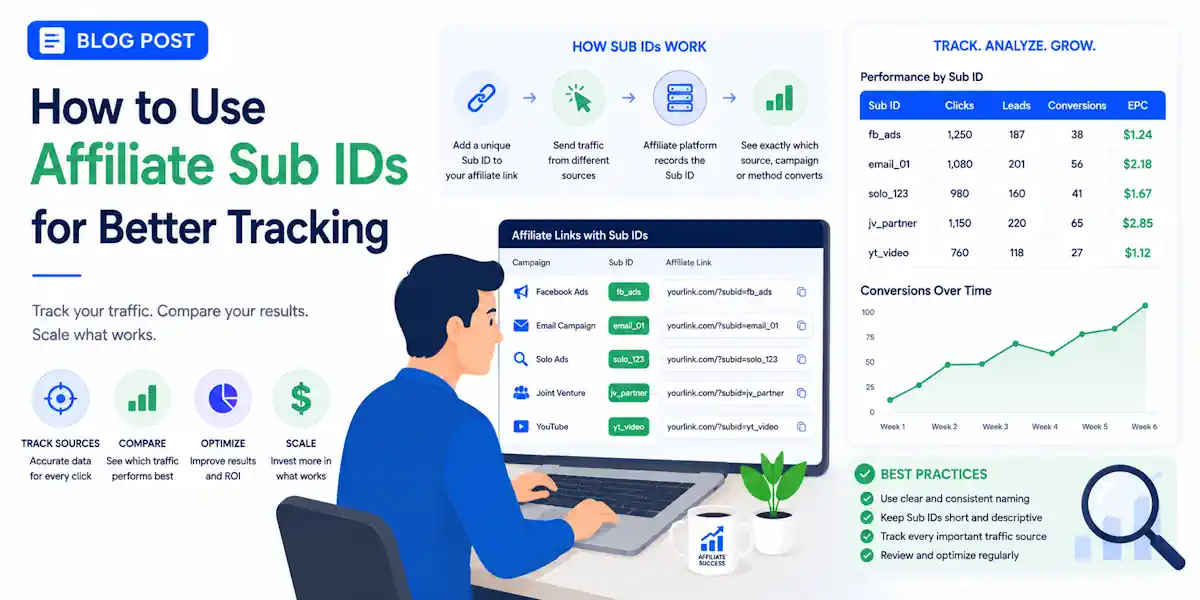

Blind traffic in affiliate marketing gets expensive fast. If every click rolls into one bucket, you are making decisions with half the picture missing. That is where affiliate sub IDs, often referred to as a SubID, help you regain control.
Affiliate Sub IDs (or Sub-Affiliate/Tracking IDs) are custom, alphanumeric parameters you append to your affiliate links. They act as a private analytics layer, letting you track exactly which ad, social platform, blog post, or link placement generates a click or sale.
They tag your links with useful labels, so you can tell which page, email, ad, keyword, or audience brought the click.
Once you see how they work in plain English, the setup stops feeling technical and starts feeling practical.
Key Takeaways on Affiliate Sub IDs
- Gain Granular Visibility: SubIDs transform anonymous traffic into actionable data, allowing you to identify exactly which ad, page, or email drove a specific conversion.
- Standardize Your Structure: Establishing a consistent naming convention—such as using lowercase text and hyphens—prevents messy, unreadable reports and saves significant time during data analysis.
- Optimize Performance: By labeling traffic sources, creatives, and placements, you can easily determine which campaign elements to scale and which to cut, preventing wasted ad spend.
- Prioritize Privacy: Never include personally identifiable information (PII) like names or email addresses in your tracking strings to protect user privacy and comply with network policies.
Sub IDs, explained without the jargon
A SubID is an extra value added to your affiliate links. Think of it like a luggage tag for your SubID tracking; the offer is the suitcase, and the tag tells you exactly where that specific click originated.
The base affiliate link sends the visitor to the merchant affiliate network and credits your account, while the SubID adds vital context. It helps you identify whether a click came from a blog post, an email, a YouTube description, a Meta ad, or a specific search keyword.
Most platforms support this feature, though the specific field name often changes. One network might use sub1 through sub5, while another might use sid, subid, or aff_sub. Even though the labels differ, they all perform the same job. A quick reference like Track360’s Sub ID glossary shows the common naming conventions you will run into.
Here is the simple version:
https://network.com/offer?aff_id=12345&sub1=blog-review
If a conversion comes from that click, your analytics report will show blog-review beside the sale. That one small label answers a big question: “Which link did the work?”
Using these tags does not change your commission or the product offer. They only make your reporting more useful.
That clarity matters whether you are a blogger testing link placement, an email marketer comparing sequence clicks, or a media buyer trying to stop wasting ad spend. If your affiliate links have no labels, every result is just a guess. If the links have clear identifiers, those results turn into data you can actually act on.

What affiliate sub IDs can track in a real campaign
This is where sub IDs go from a nice idea to a daily tool. You can use these slots as a tracking parameter to monitor almost any part of your traffic setup, as long as your network or tracker supports the fields you need.
Here is a simple way to think about how a SubID can categorize your data:
| Slot | Example value | What it tells you |
|---|---|---|
| sub1 | Traffic sources | |
| sub2 | spring-cleanse | Campaign |
| sub3 | women-35-54 | Ad set or audience segment |
| sub4 | hook-video-2 | Creative |
| sub5 | yt-infeed | Placement |
| sub6 | water-filter | Keyword |
| sub7 | buyers-30d | Retargeting audience |
Not every network gives you seven slots. Some only give you one, while others give you five. Naming conventions also vary by network or tracker, so your setup may look different.
If your network supports only sub1 through sub5, prioritize the fields that help you improve campaign performance. For most paid traffic campaigns, that means tracking the source, campaign, audience segment, creative, and placement. Bloggers may care more about the specific page, link position, and CTA. Email marketers may care more about the campaign name, sequence, and button location.
A paid ad example using your unique affiliate ID might look like this:
https://network.com/offer?aff_id=12345&sub1=google&sub2=spring-cleanse&sub3=women-35-54&sub4=hook-video-2&sub5=yt-infeed
A content example using a SubID to track performance looks like this:
https://network.com/offer?aff_id=12345&sub1=blog&sub2=review-post&sub3=comparison-table
If you want more examples of how affiliates structure this data, Strackr’s guide to SubID tracking is a solid reference.
The main point is simple. Use a SubID to label the parts of your traffic that you might want to cut, keep, or scale later. By maintaining a clean SubID structure, you gain total visibility into exactly what is driving your conversions.
Build a naming system you can stick with
Most tracking problems start before the first click. They start with sloppy names.
If one link says facebook, another says fb, and a third says meta-paid, your report is already messy. That is why naming conventions matter. Not because they look pretty, but because clean data saves time.
If you can’t read a sub ID at a glance, you probably won’t trust it in a report.
A good system is boring, short, and consistent. By organizing your query parameters effectively, you ensure every click is accounted for.
- Pick a fixed order for your slots. For example, sub1=source, sub2=campaign, sub3=adset, sub4=creative, sub5=placement.
- Use one writing style. Lowercase works well. Hyphens or underscores work well. Spaces and random capitalization do not. Each SubID should follow this exact format to keep your dashboard clean.
- Keep labels short. yt-infeed beats youtube_in_feed_placement_version_final2. These unique identifiers help you compare performance across different traffic sources without confusion.
- Save your links in one place. A spreadsheet works. A tracker works. A notes app works if you are disciplined.
This is also where reporting hygiene matters.
Use the same names every time. Do not switch between review-page and reviewpost. Do not rename an active campaign halfway through a test unless you also document the change. When auditing your data, remember that your SubID is distinct from your main affiliate ID, which identifies your account rather than the specific traffic source.
Avoid PII, or personally identifiable information. Do not put names, email addresses, phone numbers, or customer IDs into your tracking strings. Some networks expose these values in reports or share them with advertisers. Broad labels are enough to make your SubID useful without risking user privacy.
Before you build out offers, check how your network handles parameters. The Impact Radius guide shows how one major platform frames them, and if you’re still comparing programs, this list of best affiliate networks for beginners gives you a good starting point.
Real Affiliate Sub IDs examples for blogs, email, and paid ads
The best setup depends on how you get traffic. A blogger does not need the same labels as a performance marketer running YouTube and native ads.
For blog posts and resource pages
If you promote the same offer from several pages, use custom tracking values to mark the page and link position. You can also utilize deep linking to send readers directly to specific product pages rather than a generic landing page.
A clean example of a SubID implementation looks like this:
https://network.com/offer?aff_id=12345&sub1=blog&sub2=protein-review&sub3=top-button
Now you can compare the top button against the in-content text link or the comparison table. That is useful for review sites, bonus pages, and tool roundups.
For email traffic
Email clicks deserve labels too. Otherwise, a welcome sequence and a weekend broadcast look identical in the network report. Using a specific SubID for each email helps you maintain clarity.
Try something like this:
https://network.com/offer?aff_id=12345&sub1=email&sub2=welcome-sequence&sub3=day-03&sub4=button
That setup tells you the traffic source, the email type, the position in the sequence, and the CTA format. If a plain-text link beats a button, your SubID data will show it immediately.
For paid ads
Paid traffic needs the most detail because money is on the line every day. If you are working through different paid traffic sources for affiliate marketing, start by tagging source, campaign, ad set, creative, placement, keyword, and audience where possible. You should always ensure your affiliate links are properly tagged for accurate attribution.
A search campaign might use this SubID structure:
https://network.com/offer?aff_id=12345&sub1=google&sub2=water-filter&sub3=buyers&sub4=textad-a&sub5=search&sub6=best-water-filter
A Meta campaign might use:
https://network.com/offer?aff_id=12345&sub1=meta&sub2=lead-gen&sub3=lookalike-1p&sub4=ugc-clip-1&sub5=feed
If you use a tracker, you may not type every value by hand. Many setups use tokens or macros to fill values automatically. When your volume grows, you should transition to dynamic SubIDs to handle the workload efficiently. A good example of that process is in this dynamic SubID tracking walkthrough.
The rule is simple. Use manual values when traffic is small. Use dynamic values when volume grows and manual link building turns into a headache.
Sub IDs vs click IDs, plus a quick fix list
This trips people up all the time. A SubID is not the same as a clickID.
A SubID is a label you choose. A clickID is usually a unique code generated by a tracker or ad platform.
SubIDs are human-readable. You might set sub1=google or sub4=blue-video. A clickID, on the other hand, consists of machine-style identifiers such as gclid, msclkid, fbclid, or a tracker-generated code. These specific values are essential for accurate attribution, as they help link a conversion back to one exact click.
You usually want both in your toolkit. Use clickIDs for precise attribution and postback tracking, and rely on SubIDs for readable reporting. If you are setting up more advanced workflows, you may also use server-side tracking to ensure these identifiers are captured securely and reliably.
When performing click tracking, do not force every granular detail into the affiliate network link if your tracker already captures keyword, placement, or device data. Pass only the labels you need at the network level to keep your reports clean and manageable.
When sub IDs are not passing correctly
If your report is blank or your values look wrong, check these first:
- Make sure you used the right parameter name for that network, such as
sub1instead ofsubid. - Check the final outbound link after redirects. Some redirect tools strip parameters.
- Review your tracker or ad template. A missing token can leave the field empty.
- Avoid odd characters, spaces, and long strings that break URLs.
- Give reports time to update. Some networks do not show SubID data instantly.
One more tip, always click-test a fresh link before spending money. A five-minute test can save a week of bad data.
Frequently Asked Questions About Affiliate Sub IDs
What is the difference between a SubID and a ClickID?
A SubID is a human-readable label you manually assign, such as “blog-post” or “email-test,” to categorize your traffic. A ClickID is a machine-generated, unique code created by trackers or ad platforms to ensure precise, automated conversion attribution.
Can I use SubIDs on all affiliate networks?
Most reputable affiliate networks support SubIDs, but the naming conventions vary, with some using terms like sub1, sid, or aff_sub. Always check your specific network’s documentation to identify the correct parameter names before building your links.
How many SubID slots should I use?
Most networks provide between one and five slots, though some offer more. You should prioritize the labels that most impact your decision-making, such as traffic source, campaign name, and creative type, ensuring you don’t overcomplicate your tracking structure.
What should I do if my SubID data isn’t showing up in reports?
First, verify that you are using the correct parameter name required by your specific network and ensure no redirects are stripping the parameters from your URL. Additionally, check if your tracking template is correctly passing tokens and remember that some networks may experience a delay before updating your analytics dashboard.
Conclusion
Affiliate sub IDs turn a pile of clicks into something you can read. That is the whole win.
Start small. Pick a fixed slot order, use clean names, avoid PII, and keep your links organized. Your SubID acts as a label, while click IDs provide the necessary attribution trail. When you keep your naming conventions consistent, your reporting becomes clear and actionable, which is the ultimate goal of conversion optimization.
By mastering how you use an affiliate Sub IDs for your campaigns, you stop looking at data noise and start making better traffic decisions. When your tracking is organized, your path to growth becomes much easier to navigate.