Malcolm Keith 2026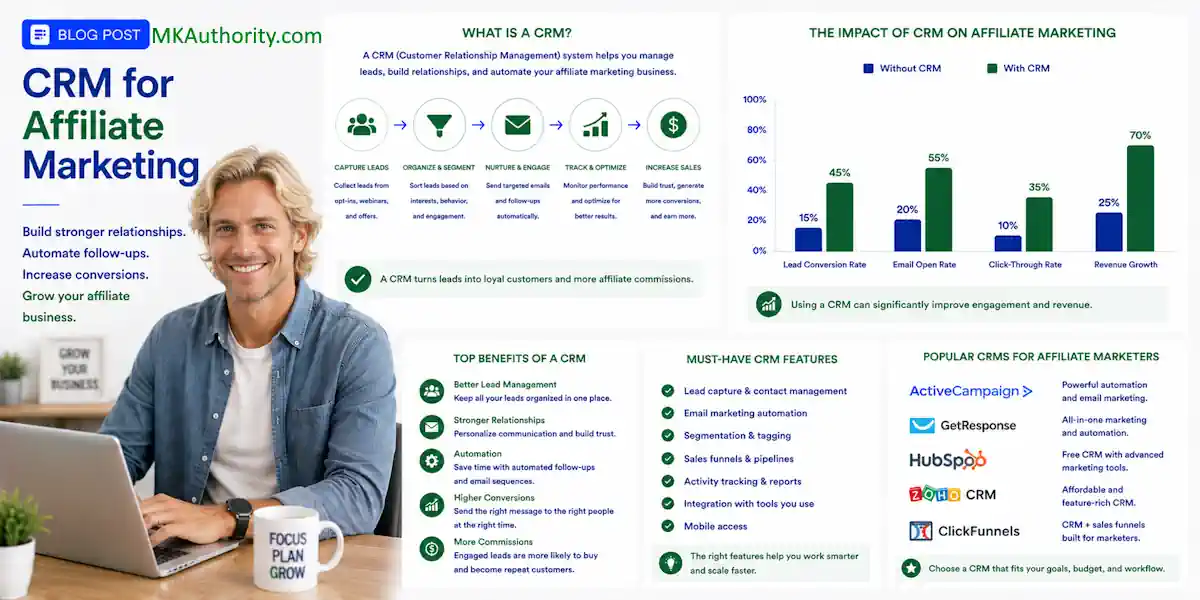

Affiliate leads don’t usually disappear because your offer is bad. They disappear when you’re busy as an affiliate marketer, posting across marketing channels, running ads, or chasing the next traffic source.That is why a CRM for affiliate marketing can be one of the smartest low-cost tools you add to your business.
If you are none the wiser, CRM stands for Customer Relationship Management. A software tool and business strategy that helps you track every interaction with current and potential affiliate contacts. It can store contact details, notes, purchase history, and emails in one place.
Acting as a lightweight customer relationship management system keeping every lead, message, source, and next action in one place without forcing you to build a complicated sales operation.
You don’t need a huge team or an expensive monthly plan. As a solo affiliate, you can wait on enterprise affiliate management software until lead volume justifies it. A simple CRM supports follow-up and tracks clicks, opt-ins, and next actions, but it doesn’t create passive income by itself.
Key Takeaways About CRM for Affiliate Marketing
- A CRM for affiliate marketing keeps leads, traffic sources, messages, notes, and follow-up tasks organized in one place.
- Most solo affiliates should start with an affordable CRM such as HubSpot, Zoho CRM, EngageBay, or Brevo instead of buying merchant-side affiliate management software.
- Use tracking parameters, referral links, campaign fields, and conversion-window details to connect lead activity with clicks, sales, commissions, refunds, and reversals.
- Start with one simple pipeline and a small workflow automation path, then upgrade only when lead volume, team coordination, or follow-up complexity justifies the cost.
- Measure cleared commissions and campaign profitability—not only clicks or reported sales—before increasing your traffic or ad budget.
CRM for affiliate marketing: what you really need

A CRM is not the same thing as affiliate management software.
Affiliate tracking tells you which link got a click or sale. Merchant-side affiliate management software handles affiliate program operations, such as partner records and payouts, rather than personal lead follow-up.
A CRM focuses on the actual person behind that click. It supports customer relationship management by storing their name, email, traffic source, notes, replies, and follow-up stage.
For a solo affiliate marketer, this can stop the usual mess of spreadsheets, sticky notes, browser tabs, and old email threads.
Your CRM should tell you who to contact next, why they joined your list, and what offer they saw first.
Set up a simple sales pipeline with stages such as:
- New lead
- Confirmed subscriber
- Replied or engaged
- Interested in an offer
- Customer or team member
- Not interested right now
You can then create tags for traffic source, affiliate network, affiliate program, offer, niche, and campaign. The same offer may need different follow-up depending on the target audience and network source. A lead from a TikTok ad for a business opportunity shouldn’t get the same follow-up as someone who opted in through a free affiliate training page.
Keep the source data clean from day one. Use tracking parameters, referral links, and separate links for different ads, landing pages, emails, and traffic sites. Check the affiliate portal for offer details, then record them in the CRM’s contact fields or campaign notes.
Include the commission structure, commission rate, recurring commissions, and conversion window. These details can affect follow-up and lead prioritization. This affiliate conversion tracking guide can help you see the full path between a click, an opt-in, and a real commission.
Best CRM tools for affiliate leads on a budget
The best CRM tools for affiliate leads on a budget are easy to start with, but they also give you room to grow once leads begin coming in.
The right choice depends on your affiliate program’s lead volume and rules. A CRM may complement affiliate management software, especially when referral links or an affiliate portal come from another system.
Before choosing, check the follow-up needed for recurring commissions and the offer’s conversion window. CRM features don’t set attribution timing, so don’t choose a CRM based only on the offer’s commission rate.
Public plan details below were available in August 2026. Prices and free-plan limits can change, and annual billing is usually cheaper than paying month to month.
| CRM tool | Free-plan highlight | Paid starting point | Best fit |
|---|---|---|---|
| HubSpot CRM | Up to 2 users and 1,000 contacts | Starter from about $15 per user/month | Beginners wanting a familiar, simple CRM |
| Zoho CRM | 3 users, 5,000 records, and limited automation | From about $14 per user/month, billed annually | Affiliates who want workflow rules on a budget |
| EngageBay | Up to 15 users and 250 contacts | From about $12.74 per user/month, billed annually | All-in-one email marketing and CRM users |
| Brevo | Unlimited contacts, 1 user, and 300 emails per day | Paid plans vary by sending needs | Big lists and email-led follow-up |
| Freshsales | 3 users, 1,000 contacts, and lead scoring | From about $9 per seat/month, billed annually | Small teams using phone or chat follow-up |
| Bitrix24 | Unlimited users and contacts, with feature limits | Paid plans from about $49/month for 5 users | Teams that need lots of seats without high costs |
These CRMs organize contacts and follow-up, but they aren’t full replacements for affiliate management software. They can complement merchant-side tools when you need lead management, email, or team tasks.
HubSpot CRM for simple lead management
HubSpot is a solid starting point when you want something clean and recognizable. You can keep contacts, notes, tasks, and deal stages in one place without getting lost in settings.
The free plan has limits, especially around automation and larger contact volumes. Still, it is enough for a beginner capturing leads from a landing page and sending personal follow-ups.
HubSpot can complement affiliate management software when you need a familiar place for lead notes and sales activity. It may feel expensive later if you need advanced automations, but you don’t have to pay before your lead flow proves itself.
Zoho CRM for low-cost automation
Zoho CRM is one of the stronger choices if you need more records and basic workflow automation without a high monthly bill. You can create rules that assign tasks, update lead stages, or remind you to follow up.
Zoho can complement affiliate management software with lead rules, but it doesn’t replace merchant-side controls. The trade-off is that Zoho takes more setup time, and beginners can overbuild things quickly.
Keep it simple. Build one pipeline, a few tags, and a small number of rules. You can add more later when your campaigns are working.
EngageBay for email follow-up and lead nurturing
EngageBay is a good fit when you want your CRM, email marketing, forms, and automation under one roof. It can complement affiliate management software when email nurturing matters more than merchant-side controls.
The free plan is limited to 250 contacts, but it allows up to 15 users and includes basic marketing automation. That can help you nurture leads for offers with recurring commissions.
That can be a nice deal if you are building a list for affiliate offers, network marketing, coaching, or home-business leads.
The main downside is the contact limit. If you are driving traffic hard, you may outgrow the free plan faster than expected. On the other hand, paying around $12.74 per user per month on annual billing can still be reasonable if it replaces several separate tools.
Brevo for big email lists
Brevo is different. It can complement affiliate management software when email follow-up matters more than merchant-side controls.
It is more email-first than a sales pipeline, which can be perfect for affiliates who mainly want to build a list and send consistent, value-based follow-ups.
Its free plan allows unlimited contacts, but sending is capped at 300 emails per day. That is fine while your list is small or you are mailing in segments. It becomes restrictive if you need to send a broadcast to thousands of subscribers at once.
Brevo is a good choice when list size matters more than having a fancy deal CRM. It also forces you to think about email quality instead of blasting the same offer to everybody.
Freshsales and Bitrix24 for growing teams
Freshsales is worth a look if you talk to leads through phone, chat, or email and want basic AI lead scoring. It can complement affiliate management software for lead conversations, but its free plan has no third-party integrations, so check that carefully before committing.
Bitrix24 gives you a lot for free, including unlimited users and contacts. Nice, right? It can suit affiliate managers coordinating tasks across e-commerce platforms, but the interface can feel heavy.
Growing subscription offers with recurring commissions can make shared permissions and task management more valuable. Bitrix24 is better for a growing affiliate team than someone who only needs a basic follow-up system.
Pipedrive is another good paid option once you have consistent leads and sales. It can complement affiliate management software when your main need is a clear deal process.
It has a 14-day free trial rather than a permanent free tier, so don’t rush into it. Review Pipedrive’s affiliate marketing software overview if you want to compare the CRM side with broader affiliate software needs.
Build a simple affiliate lead workflow
You do not need 25 automations. Start with one clear workflow automation path. For a solo lead workflow, affiliate management software is usually more than you need because it serves merchants managing partners.
- Send traffic through your main marketing channels to one focused landing page built for your target audience, with one clear opt-in reason.
- Add the lead to your CRM with affiliate tracking parameters, including the traffic source, campaign name, and referral links used.
- Trigger a short email sequence that delivers useful information first.
- Create a task to personally follow up when the person replies, clicks repeatedly, or requests details.
Your funnel and CRM should work together.
The landing page captures the lead, and the autoresponder starts communication. Marketing automation moves the contact into your CRM sales pipeline for human follow-up. If you are still choosing a page builder, compare these funnel builders for affiliate marketing before paying for a complicated system.
Put useful fields inside each contact record:
- The offer or lead magnet they joined through
- The specific referral links, offer, or campaign the lead saw
- The affiliate network and affiliate portal that supplied the lead, so you know where the contact originated
- The traffic source and campaign name
- Their last email click or reply
- Any coupon codes shown or used
- Whether paid traffic is allowed for that affiliate program
- The commission rate and whether the offer pays recurring commissions
- The conversion window used for attribution
- Cookie duration, commission type, and payout schedule
- Your next follow-up date
Follow-up may differ by offer type. One-time offers need prompt action, while subscriptions with recurring commissions may justify longer nurturing. Use the conversion window to decide how long to continue follow-up and when to evaluate a campaign.
Automation reduces repetitive work for an affiliate marketer, but it does not make the business automatic or guarantee passive income.
This is where the CRM earns its keep. You can see which traffic source brings responsive people, not only cheap clicks. A lead-management workflow organizes prospects, while affiliate management software organizes a merchant’s partner system.
Choose affiliate management software when you recruit and support partners, rather than when you simply follow up with leads.
Watch your numbers, not only your leads
A CRM can make you organized, but it can’t rescue a campaign that loses money.
If you buy traffic, compare cost and conversion performance across your marketing channels, using referral links to connect source-level clicks with costs. Track cost per click, cost per lead, conversion rate, refunds, reversals, cleared commissions, and affiliate management software costs.
Use a consistent conversion window when measuring each campaign reporting period. A longer conversion window can capture delayed purchase behavior, not just same-day sales. A reported sale is encouraging. Cleared cash after refunds is what pays the bills.
Use this simple estimate before increasing your ad budget:
Expected commission per click = sales conversion rate x commission per sale x (1 – refund and reversal reserve)
Your offer economics start with its commission rate and sales conversion rate. A one-time sale has a simpler value model than recurring commissions, which depend on customer lifetime value. For recurring commissions, adjust the simple formula for expected lifetime value.
Say an offer pays $35 per sale, based on its stated commission rate. Your page converts at 2%, and you hold back 20% for refunds or reversals.
Your expected value is $0.56 per click:
0.02 x $35 x 0.80 = $0.56
Treat projected commissions as estimates, not guaranteed passive income. Paying $0.56 per click would leave nothing for the CRM, landing page, email system, tracking software, creatives, or profit. As volume grows, check whether additional affiliate management software earns its keep. A safer bid has breathing room.
Compare the commission rate with refunds, costs, and conversion performance before scaling. Recurring commissions also depend on payout timing, so budget for delays between a sale and cleared cash. Compare offers using the same conversion window when possible, because different attribution periods can change the result.
Cookie duration matters here too. A 30-day or 90-day conversion window gives a prospect more time to buy, but it doesn’t guarantee you get credit. Affiliate management software can organize attribution, but each affiliate program may set different rules, including last-click attribution. Within that conversion window, another affiliate may take the commission before the sale closes. Coupon codes or a retargeting ad can overwrite that attribution.
CRM versus affiliate management software
Affiliate management software is mainly for merchants running their own affiliate program. Tools such as Rewardful, Refersion, PartnerStack, and Tapfiliate create referral links, support affiliate tracking, manage payouts, and give partners an affiliate portal for links and offer terms.
That is useful if you own a subscription business, membership site, or online store. Affiliate management software gives affiliate managers shared partner administration and workflow automation, unlike the simpler deal CRM an individual affiliate marketer usually needs.
A SaaS business usually needs to track subscriptions, upgrades, cancellations, and recurring commissions. Affiliate management software can connect those events to the conversion window and apply a commission structure with a defined commission rate.
E-commerce businesses usually care more about product orders, coupon codes, returns, and attribution across e-commerce platforms. When they offer subscriptions, affiliate management software helps affiliate managers report recurring commissions after cancellations or refunds, while supporting marketing automation.
Before buying affiliate management software, compare real feature reviews in G2’s affiliate marketing software category, especially for affiliate network support and partner data. Some low-cost options look attractive at first but may lack tracking, fraud prevention, or payout support. A budget affiliate software comparison can help you assess low-cost affiliate management software, conversion window rules, and trial terms before paying.
For most affiliates, start with a CRM and link tracker. Consider affiliate management software when your growing operation needs affiliate managers, an affiliate portal, new referral links, recurring commissions, and broader conversion window reporting for your own affiliate program or partner program.
The best buying choice for most affiliates
Start with HubSpot for the easiest free option, or choose Zoho CRM for more records and simple automation. EngageBay is the better low-cost all-in-one choice when email follow-up is a big part of the business. These CRMs suit most individual affiliates without affiliate management software. Choose by lead volume and follow-up complexity, not just an affiliate program’s advertised payout, commission rate, or recurring commissions.
Brevo is strong for list building. Bitrix24 makes more sense for a larger team, especially in a SaaS business where affiliate managers need permissions, tasks, and shared records. Check that the CRM stores or connects to the referral links and source data you actually use, and supports your conversion window.
Don’t choose a tool because it has 200 features you may never touch, even if it includes a deal CRM. Don’t buy merchant-side affiliate management software for a partner program before you manage your own partners.
Pick the CRM you’ll actually open every day, based on how your target audience responds through email, chat, or personal follow-up. Good customer relationship management comes from a simple follow-up habit, not an expensive dashboard nobody uses.
Frequently Asked Questions About CRM for Affiliate Marketing
What is a CRM for affiliate marketing?
A CRM for affiliate marketing stores lead information, traffic sources, messages, notes, and next follow-up actions in one place. It helps an affiliate marketer manage relationships with prospects without needing a complicated sales operation.
Is a CRM the same as affiliate management software?
No. A CRM focuses on personal lead follow-up, while affiliate management software is built for merchants managing partners, referral links, affiliate portals, payouts, and program attribution.
Which CRM is best for a solo affiliate marketer?
HubSpot is a simple starting point for beginners, while Zoho CRM offers more records and basic automation at a low cost. EngageBay works well for email nurturing, and Brevo is a strong choice when list size matters more than deal-pipeline features.
What should affiliate marketers track in a CRM?
Track the lead’s offer or lead magnet, traffic source, campaign, referral links, affiliate network, email activity, commission rate, conversion window, and next follow-up date. These details help you compare campaigns and tailor follow-up to each offer.
When should an affiliate buy affiliate management software?
Most individual affiliates can start with a CRM and link tracker. Consider affiliate management software when you manage your own partners, need an affiliate portal and payout controls, or require broader tracking for subscriptions, recurring commissions, and partner reporting.
Final Thoughts
The right CRM for affiliate marketing helps you stop treating leads like random email addresses. You can see where people came from, what they want, and when to follow up.
Start free, track results by offer or affiliate program, and upgrade only when leads and commissions support it. Wait on affiliate management software until you’re managing your own partners or have enough revenue to justify it. More traffic can bring sales, but consistent follow-up supports long-term income, not guaranteed passive income.