Malcolm Keith 2026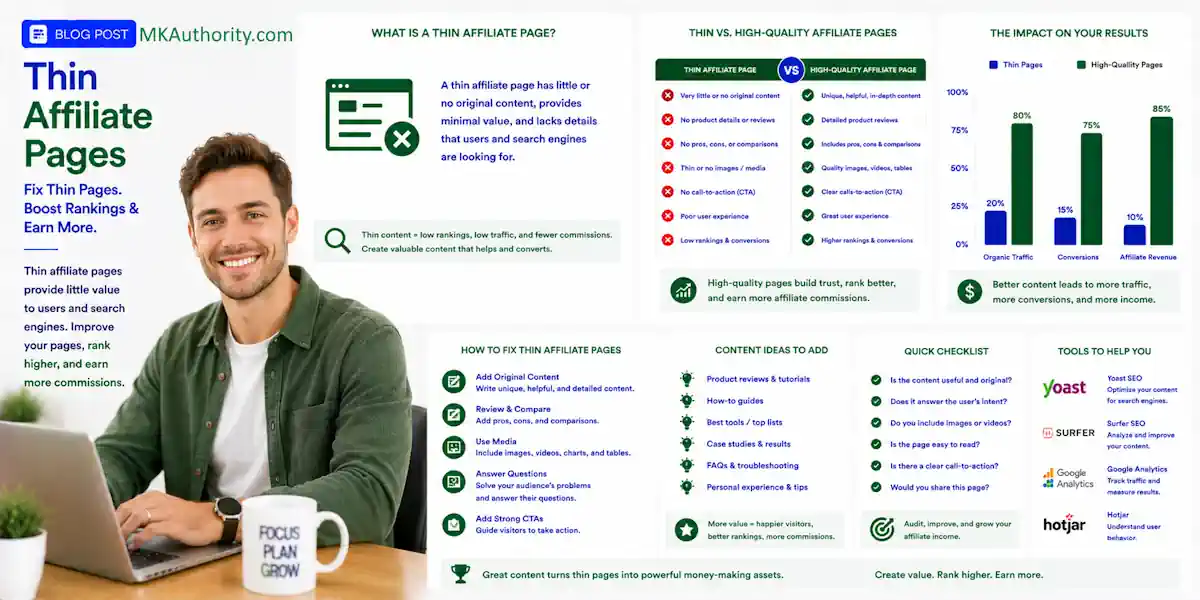

Thin affiliate pages are web pages that contain product or service affiliate links but offer little to no original content, value, or insight. One weak affiliate page rarely wrecks a site. Hundreds of copied product descriptions, thin bridge pages, and old promo URLs can create a much bigger problem.
These pages of thin content typically copy product descriptions, images, and specifications straight from a merchant’s data feed or manufacturer website without adding human analysis, real testing, or unique reviews.
Why They Are a Problem
- Search Engine Penalties: Major search engines like Google explicitly target thin affiliation in their Spam Policies. Pages flagged as low-value duplicates can face severe rank drops or removal from the index.
- Poor User Experience: Visitors find identical text and specs that they could read directly on the original merchant site, wasting their time.
- Lack of Trust: Cookie-cutter layouts that exist solely to harvest commissions fail to build user loyalty or authority.
Thin affiliate pages can waste crawl attention, compete for the same keywords, and bring in visitors who leave before they ever become subscribers or buyers. In affiliate marketing cleanup, noindex is one tool, not a way to improve a third-party domain authority score.
Large-scale patterns may contribute to broader ranking problems or algorithmic demotion, but noindex isn’t a penalty fix; decide which pages deserve a real upgrade, which should merge, and which should stay out of Google.
Key Takeaways On Thin Affiliate Pages
- Noindex contains a low-value affiliate page; it does not fix copied content, weak claims, poor funnels, penalties, or broader algorithmic demotions.
- Keep and improve pages that answer a real question, merge pages with overlapping intent, and noindex URLs that must remain live but offer no search value.
- Use a robots meta tag or
X-Robots-Tag, keep the URL crawlable, and never block the same URL inrobots.txtwhen relying on noindex. - Remove noindexed URLs from XML sitemaps, reduce unnecessary internal links, and verify the live directive through crawling and Search Console.
- The strongest long-term solution is original, useful affiliate content with firsthand proof, comparisons, limitations, pricing context, alternatives, and clear disclosures.
When noindex is the right move
Start with the job the page was meant to do. A genuine review that fell short may deserve a rebuild. A near-duplicate merchant feed may create duplicate content, while an expired campaign page may not deserve a place in search. Copied sources may contain scraped content; pages built mainly to funnel users elsewhere may be doorway pages, but legitimate bridge pages aren’t automatically one.
Noindex contains a problem, it doesn’t fix one
Google doesn’t ban affiliate links or affiliate sites. Its spam policies for Google Search call out “thin affiliation” when pages repeat merchant descriptions or reviews without adding original value. Google’s quality guidelines still favor useful, people-first pages, even when unoriginal content doesn’t violate a spam policy.

That is the issue. The helpful content system asks whether a page adds original, people-first value. A page that repeats the merchant’s wording and adds a big “Buy Now” button gives Google and the visitor little to work with.
Noindex asks search engines not to place that URL in search results. It doesn’t improve weak copy, repair a bad funnel, or make a site-wide pattern disappear. It won’t reverse Google penalties or an algorithmic demotion.
Manual actions involve a reviewer, while algorithmic outcomes can reflect broader signals. If 200 URLs use the same thin template, hiding 10 won’t solve the bigger quality issue.
Keep, merge, or hide the page
Use a simple three-way decision before adding a directive:
- Keep and improve pages that target a real question and can include firsthand experience, comparisons, pricing context, pros, cons, or useful alternatives.
- Merge and redirect pages that cover the same intent. Keep the stronger URL, combine the best material, then use 301 redirects when the new page is a close match.
- Noindex URLs that must stay live for paid traffic, old subscribers, or internal use but offer no search value.
An ad-only landing page is a common example. It may be fine to noindex that URL if it is not meant to rank. Still, it needs honest copy, clear disclosures, and a good user experience. Noindex does not give a poor landing page a free pass.
How noindex works on thin affiliate pages
A noindex directive is sent through a robots meta directive or an HTTP response header. Google generally needs crawl access to see that instruction, so crawlability and deployment both matter.
Use a robots meta tag or X-Robots-Tag
For an ordinary HTML page, place a robots meta tag in the <head> section, such as <meta name="robots" content="noindex">. For PDFs, image files, and other non-HTML resources, use the X-Robots-Tag: noindex HTTP header instead.
Google’s guide to blocking indexing with noindex covers both options. Use one clear directive, then test the page source or server response. Don’t rely only on a setting inside a WordPress plugin.
Keep the directive in the original HTML or HTTP header. Google warns that JavaScript may be skipped when a crawler encounters noindex. Don’t depend on JavaScript to add or remove the directive after the page loads. Its JavaScript SEO guidance explains why this can create confusion.
Don’t block the URL in robots.txt
This is a costly mistake. A site adds noindex, then blocks the same folder in robots.txt.
If Googlebot can’t crawl the page, it may not be able to read the noindex instruction. Google’s robots.txt documentation is clear: robots.txt manages crawling, not index removal.
A crawler needs to see the noindex directive before it can act on it.
If the URL is currently blocked, remove that block, publish noindex, and allow Google to recrawl it. Removal from search results isn’t instant. Google still needs to revisit and process the URL.
Make page-level decisions before site-wide changes
A sudden traffic drop can make you want to noindex every affiliate page in sight, but don’t do that. A site-wide template change can remove useful pages that build trust, search rankings, and future commissions. Domain authority is only a secondary metric, not a reason to remove useful pages. Don’t treat the change as proof of an algorithmic demotion or manual actions.
Separate search content from campaign content
Look at URL groups, not just single pages. A controlled content pruning review may reveal thin category pages, internal search pages, old bonus pages, or programmatically generated product listings that add no useful information. Merge URLs when duplicate content serves the same query, rather than noindexing every page.
Keep the pages that address a clear search intent. Light keyword research can validate whether a page answers a distinct query before you noindex it. For example, a strong affiliate bridge page can explain who an offer suits, what it costs, what the buyer should expect, and where it may fall short. That is very different from sending visitors through a headline and a button. Review these differences in this guide to direct linking versus bridge pages.
Don’t noindex a real review merely because it has low organic traffic today. A narrow topic may still serve a valuable audience. Improve its usefulness first, then decide whether it has a realistic chance to earn its place in search rankings over time.
Clean up links, canonicals, and sitemaps
Canonical tags and noindex directives do different jobs. The former identifies the preferred version of a URL, while the latter tells search engines not to include the current page in results. Don’t use a canonical signal as a substitute for noindex.
When you noindex a page, remove it from your XML sitemap. A sitemap tells search engines that a URL matters, while noindex says it shouldn’t appear in results. Those messages don’t work well together.
Also review internal linking. A noindexed page can still be useful to existing customers or email subscribers. But it shouldn’t sit in your main navigation, popular-posts block, or key category pages as if it’s a major organic asset.
Audit and repair affiliate pages with real proof
A useful content audit starts with Google Search Console data and a proper crawl, not guesswork. Together, they show where thin patterns are hiding and which pages need attention.
Find the pages that are holding you back
Compare organic clicks, impressions, indexed URLs, and Page Indexing issues over several months. Use the URL Inspection tool on sample pages to check whether Google can crawl each URL and see its current indexing status.
Then crawl the site with Screaming Frog. Look for repeated titles, duplicated H1s, short body copy, automated content, missing canonicals, and clusters of pages with almost identical affiliate links.
Domain authority may add context, but it shouldn’t override page-level evidence. Page-level quality and usefulness still matter most.
Low word count alone does not prove a page is thin, and the panda algorithm did not make it the sole test. Unoriginal content can remain weak even when it is long. Short pages can solve simple problems, but merchant copy plus a tracking link is a warning sign.
Also check the Manual Actions report. An algorithmic demotion can cause a broad ranking decline without a message or reconsideration request. Manual actions appear in Search Console and require you to fix the affected issue across the site before requesting review.
Add value people can see and use

The strongest fix is a helpful content system built around firsthand proof and useful decision information. Don’t pad a page with 1,000 extra words; add details the merchant can’t provide.
For affiliate products, include tested setup steps, honest limitations, and feature comparisons. Add screenshots you have permission to use, pricing details, decision criteria, and clear alternatives. Never pretend you tested a product if you didn’t.
For paid offers, useful content can include realistic numbers rather than income hype. A simple planning formula is:
Expected payable EPC = sales conversion rate x commission per sale x (1 – refund and reversal reserve).
That figure is a rough ceiling, not a safe traffic bid. Reported commissions can look awesome. Refunds, reversals, tracking costs, autoresponder fees, and ad spend decide whether the campaign leaves any cleared cash.
Put a clear disclosure near your first affiliate link, too. These FTC affiliate disclosure examples can help you keep it simple and visible. If you use paid ads, follow the same original-value standard explained in this Google Ads affiliate policy guide. Keep claims accurate and follow Google’s spam policies.
Publish noindex cleanly, then watch the result
Once the audit is complete, make the change in a controlled order. Rushed noindex rules can remove pages you meant to keep.
Use a safe deployment order
First, record the URL, its current traffic, links, canonical target, and reason for the decision. Next, add the robots meta directive or X-Robots-Tag.
Remove noindexed URLs from the XML sitemap and reduce unnecessary internal links. If you are consolidating content, use 301 redirects for a close-match page instead of leaving visitors on a dead-end page.
Finally, check the live URL. Confirm it returns the intended response, the directive is visible, and robots.txt does not block Google from reaching it. A page that should stay out of search will often return a crawlable 200 response with noindex.
Run a follow-up crawl in screaming frog to verify directives, sitemap status, internal links, and response codes.
Monitor Search Console after the change
Use URL Inspection to request a recrawl when appropriate. Then watch the Page Indexing report, organic traffic, search rankings, impressions, and affected URL groups over the following weeks.
Check for manual actions separately, since they are distinct from normal indexing changes.
Don’t call it a recovery because one bad URL disappears, or infer an algorithmic demotion from that single change. Look for a cleaner index, stronger surviving pages, better organic clicks, and fewer low-value URLs competing for the same topic.
Frequently Asked Questions
What are thin affiliate pages?
Thin affiliate pages mainly repeat merchant descriptions, reviews, or promotional copy without adding original value. Pages with little useful information beyond an affiliate link or “Buy Now” button are common examples.
When should I use noindex on an affiliate page?
Use noindex when a page must remain available for paid traffic, subscribers, customers, or internal use but has no realistic search purpose. Improve a potentially useful review or merge overlapping pages before deciding to hide it from search.
Can I block a noindexed page in robots.txt?
No. Google generally needs to crawl the URL to see and process the noindex directive, so blocking it in robots.txt can prevent removal from search results.
Does noindex fix a Google penalty or algorithmic demotion?
Noindex does not repair weak content, reverse a manual action, or fix a site-wide quality pattern. It only tells search engines not to include the specific URL in search results after they can access and process the directive.
How can I add value to an affiliate page?
Include firsthand testing, setup details, honest limitations, comparisons, pricing context, decision criteria, and useful alternatives. Keep claims accurate, disclose the affiliate relationship clearly, and never imply that you tested a product when you did not.
Final Thoughts On Thin Affiliate Pages
Noindex helps when a page needs to exist but shouldn’t rank. It’s not a shortcut for thin content, weak claims, or copied merchant descriptions.
The better long-term approach is simple: keep pages that help people decide, merge pages that repeat one another, and noindex URLs that add nothing. Useful affiliate content earns trust before it asks for a click.