 Malcolm Keith 2026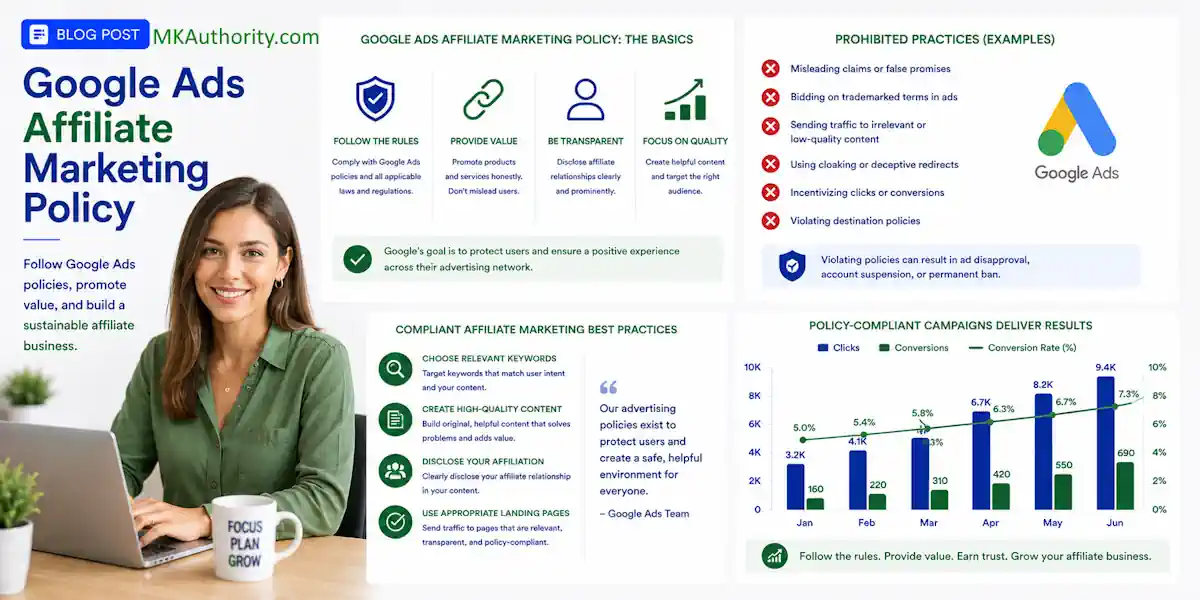

One careless final URL can drain your ad budget before a real prospect sees your page. The good news is that the Google Ads affiliate marketing policy doesn’t ban affiliate links or affiliate marketers.
Problems start when an ad leads to a thin page, confusing redirect, copied merchant content, or an unrealistic promise.
You can use affiliate marketing with Google Ads, but build a real little business around the offer. Use a landing page builder to create an affiliate landing page you control, not a shortcut that sends everyone elsewhere.
Key Takeaways On Google Ads Affiliate Marketing Policy
- Google Ads does not ban affiliate marketing, but your ad destination must be functional, useful, easy to navigate, and offer original value.
- Use an affiliate landing page on a domain you control instead of sending traffic directly to a raw affiliate tracking URL or a page you cannot improve.
- Build value-first review, comparison, or lead-generation pages with accurate claims, clear affiliate disclosures, contact details, privacy information, and a relevant call to action.
- Check both Google Ads policies and the merchant’s affiliate rules before bidding on brand names, using trademarks, or linking directly to a merchant page.
- Calculate expected commission, track clicks through cleared commissions, and scale only after accounting for refunds, operating costs, consent, and real conversion data.
Google Ads Policies: What Google Really Looks For
Google cares about the whole experience after someone clicks. Your ad, keyword, landing page, redirect path, and claims all matter.
The main rule is simple: your destination must be functional, useful, easy to use, and provide original content with unique value. Google’s Destination requirements cover this standard in detail.
That means affiliate marketing is allowed. A page full of copied sales text with one big affiliate button is where trouble begins.
Your website should tell visitors who you are, what the page is about, and what happens when they click through. Using a landing page builder gives you control over custom page structure and the URL. Your chosen landing page builder can also help configure navigation and redirects. Your page needs a privacy policy and a way to contact you. These basics may sound boring, but they help show Google and your visitors that there is a real business behind the ad.
Here is the part beginners often get wrong: an affiliate link is not automatically prohibited. Direct linking a Google ad to a raw affiliate tracking URL is simply high-risk. You don’t control the destination, redirect chain, page quality, or future changes made by the merchant.
A Google Ads community discussion about affiliate marketing destinations makes the practical point clearly, avoid advertising pages you do not control.
Your ad should lead to a page you own and improve, not a page whose only job is to push the visitor out as fast as possible.
Build Value-First Landing Pages That Help Visitors Decide
Think of an affiliate landing page as the helpful person between a searcher and a buying decision. It should answer questions the merchant’s sales page may avoid.
If somebody searches “best email autoresponder for beginners,” they don’t want to hit a generic tracking link. An independent review website can answer the questions they care about. What does it cost? Who is it good for? Is it easy to use? What are the weak spots?
A strong affiliate review page can include:
- Your own explanation of the product and the problem it solves, organized into clear sections with a landing page builder.
- Pros, cons, pricing context, and realistic limits.
- A comparison with one or two relevant alternatives.
- Screenshots, personal experience, use cases, or simple comparison tables that support a clear decision. A landing page builder can help you build this component, though advanced filters may need custom code.
- Clear FTC disclosures, with affiliate disclosure language near the recommendation and links.
- A direct, plain-language call to action.
You don’t need a 5,000-word monster page. But you do need original content that couldn’t be copied and pasted onto 100 other affiliate sites.
A short affiliate landing page can work if it genuinely educates or qualifies the visitor before a recommendation and CTA. For example, a bridge page that explains a training program, tells readers who it suits, shares the price structure, and gives them an optional bonus has a purpose.
A page with a fake countdown timer, huge income promises, and one “Get Instant Access” button does not.
Helpful reviews and comparison pages are a common compliance pattern, as this overview of Google Ads affiliate marketing rules also explains. Keep the page clean on mobile. A landing page builder can test responsive layouts, but check forms, buttons, and tables yourself. Avoid aggressive popups, autoplay noise, and ads that cover the content.

Also, make your ad message match the page headline. If the ad says “Email Marketing Tool Comparison,” the visitor should land on a real comparison. A landing page builder can make headline edits easy. It can’t fix a mismatch, so don’t send visitors to an unrelated business opportunity video.
Three Compliant Affiliate Funnels That Make Sense
There are several ways to approach affiliate marketing with Google Ads and stay inside the Google Ads affiliate marketing policy. The best option depends on your offer, tracking setup, and level of control. Use Keyword Planner to confirm search intent before choosing a funnel.
| Funnel type | What the visitor sees | When it fits |
|---|---|---|
| Review or comparison page | An affiliate landing page on a review website, with product analysis and comparison tables | Great for buyers searching for solutions |
| Lead-generation funnel | A useful free guide, opt-in form, follow-up emails, then an offer | Useful when the product needs more trust |
| Direct merchant page | The advertiser sends traffic straight to the merchant | Only when the merchant approves it and the setup meets policy rules |

The review funnel is usually the safest place to start. Searchers already have a problem, and your content helps them decide. You also control the page, messaging, links, and disclosures, while a landing page builder keeps them organized.
A lead-generation funnel can be powerful when a landing page builder keeps the opt-in page focused. Offer something useful, such as a checklist, short guide, or beginner training. Then follow up with helpful emails before recommending the affiliate product.
With clear consent, first-party data can support enhanced conversions and help you evaluate lead quality later.
Your opt-in page should collect only the information you need.
A landing page builder can connect forms to your email platform and simplify tracking. If you use email marketing, include consent language, a privacy policy, and an unsubscribe option in every email. A smaller responsive list beats a pile of people who never asked to hear from you.
Direct-to-merchant ads are the exception, not the beginner default. Direct linking requires written permission from the merchant or affiliate network. Check their paid traffic rules, brand rules, and prohibited keywords. Google may allow the ad, while the affiliate program can still refuse to pay commissions.
For a wider look at where paid search traffic fits among other channels, see these paid traffic sources for affiliate marketing. Google traffic can be high-intent, but it is not cheap traffic.
Trademark Usage, Brand Name Bidding, and Keyword Research Without the Headaches
Can you bid on a competitor’s brand name? Sometimes, but don’t treat that as an automatic green light.
Google’s trademark rules usually focus heavily on how trademarks appear in ad copy. However, merchant restrictions can be stricter, and brand name bidding may still be prohibited. Many affiliate programs ban bidding on their brand name, misspellings, domains, or terms such as “official.”
So, read two sets of rules:
- Google’s Google Ads policies and trademark rules.
- The affiliate network’s affiliate program rules, plus the merchant’s paid-search agreement.
If a merchant says no brand bidding, respect it. Don’t try to hide the keyword inside another campaign or use strange spelling tricks. That can cost you commissions, your affiliate account, or both.
Begin with buyer intent. Terms such as “best,” “review,” “comparison,” “pricing,” “alternative,” and “for beginners” can reveal someone close to making a decision.
Use Google Keyword Planner to find search ideas, then build a tight search campaign around one problem. Review Keyword Planner forecasts, organize tightly themed ad groups, and use a landing page builder for a keyword-specific page. In a landing page builder, match ad copy to the page headline and offer for relevance and Quality Score.
Add negative keywords early. For an email platform, use negative keywords such as “jobs,” “free download,” “customer service,” or “login” to stop irrelevant clicks.
Do the Math Before You Turn Up the Budget
Google Ads can bring traffic fast. Affiliate marketing with Google Ads can also empty a small budget fast.
Before spending, use Keyword Planner to review demand and bid estimates, but don’t treat them as a budget decision. Work out your rough expected commission per click:
Expected commission per click = sales conversion rate x commission per sale x (1 – refund and reversal reserve)
Say an affiliate offer pays $35 per sale. You estimate conversion rates at 2% of visitors, and you keep a 20% reserve for refunds and reversals.
Your rough expected value is:
0.02 x $35 x 0.80 = $0.56 per click
That $0.56 helps estimate return on investment, but it isn’t a target cost per click. It is your ceiling before software expenses, including a landing page builder, email tools, tracking fees, creative costs, and profit.
If you pay $0.60 per click, the campaign is already underwater before those extra costs. Actual auction prices can vary with relevance, page experience, and Quality Score. You might see reported sales and feel excited, but reported commission is not cleared cash.
Track each stage separately:
- Clicks and cost per click.
- Opt-ins and cost per lead.
- Sales and reported commissions.
- Refunds, reversals, and hold periods.
- Cleared commissions that have actually been paid.
Treat paid ads like a test, not a lottery ticket. Set a total amount you can afford to lose, a maximum bid, and a date to review the numbers. Scale only when the numbers support a realistic return on investment, and stop when they don’t. Change one major thing at a time, such as the keyword group, headline, or landing page. Test the landing page builder separately to see whether it improves page economics.
If your budget is tight, comparing free traffic and paid ads can help you decide where to put your effort first. Organic content takes longer, but it can keep bringing visitors after the ad spend stops.
Track Leads, Sales, and Offline Conversions Properly
Affiliate tracking gets messy fast. The network may record a sale days later. A customer can use another device. A lead can return through email. Refunds can appear after you thought the campaign was profitable.
Start with a clean lead record. Capture the Google click ID through your landing page builder’s form, along with the campaign, landing page, date, and lead source. Keep those details in your CRM, spreadsheet, autoresponder, or tracking system, and pass landing-page data from the landing page builder into the CRM.
For lead-generation campaigns, don’t optimize only for every email address collected. Import the actions that matter most, such as qualified leads, booked calls, approved applications, or completed sales.
Google Ads can use offline conversion imports to connect later lead outcomes with the original ad click. Google’s current measurement guidance for enhanced conversions explains how first-party customer data can improve measurement when it is collected and handled correctly.
Enhanced conversions use hashed first-party data, such as email addresses or phone numbers, to improve matching. You still need user consent, a clear privacy policy, and a lawful reason to collect the data. Never upload random email lists or information from people who did not agree to your marketing.
If the affiliate network gives you sub-ID tracking, use it. Add a unique sub-ID to your affiliate link. Ensure your landing page builder preserves it and UTM data through the outbound link. Connect it to the lead or click record so you can see which campaign produced the sale without guessing.
Google’s requirements aren’t just about getting approved. Tracking conversions properly keeps you from scaling a campaign that only looks profitable on the surface.

What to Do When Google Disapproves Your Ad
An ad disapproval is frustrating. It is not a signal to make a new account, swap domains, or try to trick the review system.
First, open the exact notice in Google Ads and read the relevant compliance policies. Then inspect the ad and affiliate landing page as a visitor would, checking the destination requirements along the way. Review your desktop and mobile page, every redirect, the final URL, disclosures, claims, and working links.
Fix the real issue before asking for another review.
- Confirm that the ad’s final URL and the page users reach are on the expected domain. Check the landing page builder’s URL and redirect settings, remove unnecessary redirects, and never cloak content.
- Replace copied merchant text and thin content from the landing page builder with original content, explanations, comparisons, pros, cons, and useful answers.
- Use Keyword Planner to distinguish irrelevant intent from a destination problem. Remove misleading income claims, fake urgency, unsupported testimonials, or buttons that hide where the visitor is going.
- Add visible contact details, privacy information, and an affiliate disclosure near recommendations.
- Fix the page, then test it on mobile through the landing page builder. Check consent, tags, and enhanced conversions measurement settings before requesting a review.
Resubmitting the same thin page again and again rarely solves a destination problem. A better page does.
If you face a Google Ads account suspension, stop all attempts to work around it. Review the suspension reason, correct the account-level issue, and use the official appeal process. A clean appeal with real fixes is far better than creating more problems.
Quick Google Ads Affiliate Marketing Policy Compliance Checklist Before You Launch
Run through this short checklist before your first Google Ads affiliate campaign:
- Your affiliate landing page leads to a final URL on a domain you control. Use a landing page builder that lets you edit it.
- The page has original content beyond the merchant’s sales copy. Customize its template in your landing page builder so it reads like a useful review website.
- Affiliate disclosures are clear, easy to spot, and close to the recommendation.
- Ad copy and page claims are truthful and match each other.
- Use Keyword Planner to validate search terms, then review search traffic for negative keywords before launch.
- You have checked the merchant’s trademark and paid-search rules, including brand name bidding restrictions.
- The page loads properly on mobile, with no broken links or confusing redirect chains. Test responsive layouts and forms in your landing page builder.
- Connect forms in your landing page builder for tracking conversions. Record clicks, leads, sales, refunds, and cleared payouts separately, and test enhanced conversions.
- Your bid leaves room for refunds, operating costs, and profit.
Frequently Asked Questions About Google Ads Affiliate Marketing Policy
Is affiliate marketing allowed on Google Ads?
Yes, Google Ads allows affiliate marketing when the destination provides a useful, functional experience with original content. Problems usually arise from thin pages, copied merchant content, misleading claims, or confusing redirects.
Can I send a Google ad directly to an affiliate link?
Direct linking to a raw affiliate tracking URL is high-risk because you may not control the destination, redirects, or page quality. It may also violate the merchant’s paid-traffic rules, so a landing page on a domain you control is usually the safer approach.
Can I bid on an affiliate product’s brand name?
Sometimes, but Google’s trademark rules are only one part of the decision. Always check the affiliate program and merchant rules, since many programs prohibit brand bidding, misspellings, domains, or terms such as “official.”
What should an affiliate landing page include?
Include original explanations, product benefits and limitations, pricing context, comparisons, relevant evidence, a clear call to action, and an affiliate disclosure near recommendations. The page should also include contact information, privacy details, working links, and a mobile-friendly experience.
How much should I spend on Google Ads affiliate campaigns?
Start with a controlled test budget and estimate expected commission per click after accounting for conversion rates, refunds, reversals, and operating costs. Track leads, sales, and cleared commissions separately, then scale only when the campaign produces a realistic return on investment.
Build the Page First, Then Buy the Click
Affiliate marketing with Google Ads can send serious buyer traffic to an offer, but an affiliate landing page must earn the click. Start with a useful, controlled page, using a landing page builder only when it supports that experience.
Make honest claims, disclose your relationship, and measure consented first-party results with enhanced conversions. Check your real return on investment after refunds and operating costs. A landing page builder can’t replace useful content or honest claims.
The Google Ads affiliate marketing policy rewards what your future customers want: clarity and value. Give them that first, and you have a much better chance of building a campaign that lasts.


