Malcolm Keith 2026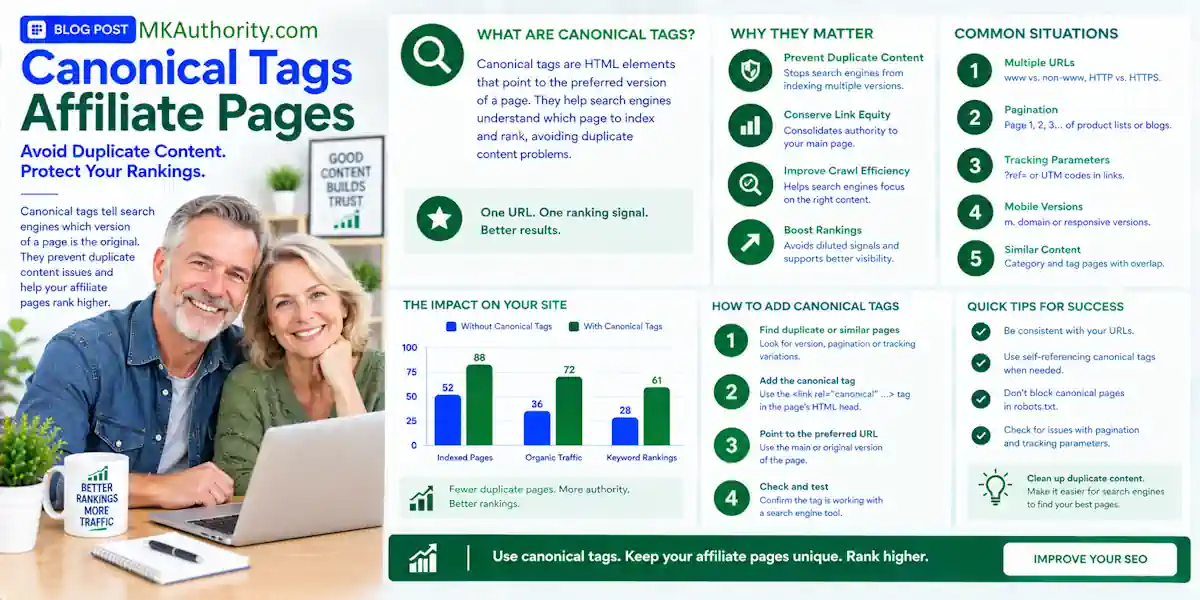

A canonical tag signals to search engines which URL is the main version. If you searched for canonical tags affiliate pages, you probably want one simple answer: point Google to the clean canonical url, the preferred version of the affiliate article, rather than a tracking URL.
A good affiliate page can lose focus fast when the same review appears under several URLs. One link may have utm tags from a campaign, but that tracking detail shouldn’t change the page’s home. This is a signal, not a guaranteed command.
Let’s keep it simple, practical, and safe for a real affiliate website.
Key Takeaways On Canonical Tags Affiliate Pages
- A canonical tag points search engines toward the preferred URL for duplicate content. Consolidating URL variations may help focus link equity and crawl budget.
- Use a self-referencing canonical on the main version of a product review or comparison page, marking it as the preferred version.
- Keep affiliate Sub IDs and tracking parameters on your outbound affiliate links, not on multiple indexable versions of your own article.
- A canonical is a strong hint, not a command. Check Google Search Console if Google selects a different search results URL.
- Don’t canonicalize two pages that target different products, different buyers, or different search intent.
- Use a 301 redirect when an old page is permanently finished, and use
rel="sponsored"on affiliate links to label the commercial relationship.
Canonical Tags Affiliate Pages Need for Clean URLs
A canonical tag identifies the preferred page when multiple versions contain duplicate content.
Think of it this way. Your product review might be available at:
/best-email-tool//best-email-tool/?utm_source=youtube/best-email-tool/?campaign=retargeting/best-email-tool/?sort=latest
The article is still the same article. You don’t need all four versions competing in search results.
Your page URL is not your affiliate destination
Your canonical url points to your affiliate publisher’s review, tutorial, or comparison page. It never points to the merchant’s checkout URL or affiliate network URL.
For example, your review page may be:
https://www.yoursite.com/tool-review/

That page can contain affiliate buttons with tracking IDs, Sub IDs, and campaign parameters. Those outbound links help you get credit for sales. They are a separate job.
Choosing the preferred page is a technical SEO decision. It helps consolidate signals such as link equity, but it doesn’t guarantee indexing or rankings.
If you build bridge pages for paid campaigns, it also helps to understand the difference between direct linking versus bridge pages. Your content page should have a clear search role, while your affiliate link sends people to the offer.
Self-referencing canonicals keep things consistent
Self canonicalization means the preferred page declares its own absolute URL.
If your preferred page is:
https://www.yoursite.com/tool-review/
That same page should use a canonical tag pointing to its own clean HTTPS URL. Google recommends this approach as part of its guidance on consolidating duplicate URLs.
When dealing with canonical tags affiliate pages, keep internal links pointed to the same clean URL. This consistency helps search engines interpret the preferred version when WordPress, a page builder, or tracking setup creates extra URLs.
How Google Chooses the Preferred URL From Canonical Tags Affiliate Pages
Google doesn’t blindly follow a canonical tag. Like other search engines, it checks your declared preference against additional signals before choosing the representative URL.
That means your canonical tags affiliate pages setup needs to agree across the site.
Your preferred canonical versus Google’s choice
Google calls the URL you set the “user-declared canonical.” The canonical URL is the preferred version you want represented in search.
They may match. That is what you want.
But Google may choose another URL if your signals conflict. For example, you may declare the HTTPS version as canonical while most site links still point to HTTP. Or you may canonicalize a page to a URL that redirects elsewhere.
Google’s URL canonicalization overview makes the point clearly: canonicalization is the process of selecting one representative URL from a group of duplicates.
A declared preference works best when your site’s signals support the same URL.
Canonicals, redirects, internal links, and an xml sitemap are different canonicalization methods. They support the same choice, but they aren’t independent ranking factors. Google can select another URL when those signals conflict.
For international sites, hreflang annotations are a separate signal. They help Google understand regional and language alternatives, but they don’t replace canonicalization.
Similar content matters more than matching keywords
A canonical is for pages that are duplicates or extremely close versions of the same page. It is not a tool for forcing one useful article to outrank another.
Publishers often consolidate duplicate signals to focus link equity on one page. However, don’t point a “GetResponse review” page to a “MailerLite review” page just because both discuss email marketing tools. Those are different products. Readers searching for them have different intent.
The same goes for a review and a comparison page. A “Tool A review” page and “Tool A vs Tool B” page can both be worth keeping when each page answers a different question.
How to Add a Canonical Tag Correctly
For most affiliate blogs, adding a canonical tag in the HTML is the easiest method. This link uses rel canonical and belongs in the html head section of the page.
Many WordPress SEO plugins add it automatically. Still, don’t assume it is right. Check the live page source after publishing.
Use an absolute preferred URL
Use the full URL, including https://. Google recommends absolute URLs because they remove ambiguity. The href attribute should contain your clean canonical URL.
Here is the basic format:
<link rel="canonical" href="https://www.mkauthority.com/affiliate-links/">
Don’t use a relative path like /affiliate-links/. Also, don’t add a tracking parameter to the preferred URL. Don’t point to a URL that redirects, returns an error, or has its own conflicting canonical.
For a product review, the canonical should usually be the clean version of the review URL. No UTM tags or paid-ad labels. No random session parameters.
An XML sitemap can support the same preference. It is one of several canonicalization methods, not a replacement for a correctly implemented HTML element.
HTTP headers are for non-HTML files
Most affiliate publishers only need the HTML element. But an HTTP Link header in an http response header can declare a canonical for non-HTML files, including PDFs.
A canonical link isn’t the same as ordinary meta tags. The HTML element belongs in the page source, while the Link header is sent with the server response.
That can matter if you publish a downloadable product guide, checklist, or PDF version of a review. For ordinary WordPress articles, keep life easy and use the canonical output in your page head.
After major theme, plugin, or site migration changes, check that your canonicals are still present. A five-minute check can prevent months of URL confusion.
Tracking Parameters, UTMs, and Affiliate Sub IDs
Tracking is important. If you don’t know which traffic source, button, or campaign produced the click, you’re guessing with your budget.
The answer isn’t to throw away your tracking. It’s to separate it from the page URL you want indexed. For the publisher’s article, the clean canonical url is the preferred version, and its single canonical tag identifies that page. This helps search engines treat tagged landing URLs as variations, while consolidating equivalent URLs can focus link equity.
Keep campaign tracking on outbound links
Your visitor may land on your review page through a link like:
/tool-review/?utm_source=youtube&utm_campaign=beginner-video
The utm tags in that URL are tracking parameters. They don’t mean the tagged version should rank in Google. Those utm tags should normally point to the clean article URL.
Your outbound affiliate button can still carry the network’s required affiliate ID and Sub IDs as tracking parameters. Those labels help you see whether the click came from a YouTube video, email, Meta ad, comparison table, or final call to action.
A consistent affiliate sub-ID tracking guide can help you label source, page, campaign, and link placement without turning your reports into a mess.
Test the whole click path before changing URLs
Don’t assume a redirect or link plugin passes every parameter correctly. Click the actual link as a visitor would.
Check the landing page, any cloaked link, the final merchant destination, and the affiliate network tracking details. Some redirects can strip parameters. A destination can load perfectly while losing the ID that credits your commission.
Keep a record of the original link, required parameters, and disclosure before a redesign or URL migration. Then compare tracker clicks, network reporting, and cleared commissions after the change.
For paid affiliate relationships, Google recommends using the rel="sponsored" link attribute. That labels the outbound commercial link. It doesn’t replace the article’s canonical setup, and it doesn’t replace a clear affiliate disclosure.
Filters, Categories, and Similar Product Pages
Affiliate sites often create duplicate URLs without realizing it. Product filters, category sorting, internal search pages, and print views can all create extra versions through faceted navigation.
Not every extra URL needs a canonical. First, ask whether the page offers a different useful experience.
Filter combinations can multiply fast
A software-tools category might create URLs for price range, rating, platform, or sorting order. This form of faceted navigation can produce duplicate content across pages showing nearly the same products.
If a filtered page doesn’t deserve to rank on its own, a canonical tag can point it to the clean category canonical url. But don’t point every filtered URL to the category by default.
A filter for “email tools for beginners” may have a different purpose than a broad “email marketing tools” category. If the filtered page has real demand and you can make it useful, it may deserve unique content and its own URL.
Pagination canonicalization also needs care. Page 2 isn’t automatically a copy of page 1, so don’t collapse it without checking its content and intent.
On large sites, faceted navigation can consume crawl budget through many low-value URL combinations. Manage those combinations carefully instead of blocking useful pages by default.
Don’t merge pages with different buyer intent
A beginner review, a pricing guide, and a comparison chart may mention the same product. They still have different jobs.
Keep pages separate when they answer separate questions. Canonicalizing distinct pages can hide useful content from search results and waste link equity by sending visitors to the wrong answer.
Your strongest affiliate pages give people something beyond a copied feature list. Include honest drawbacks, setup details, pricing context, alternatives, and proof of real use when you have it. Don’t claim product testing if you didn’t test the product.
Canonical Tags, 301 Redirects, and Noindex
These canonicalization methods solve different problems. Using the wrong one can confuse visitors and search engines.
Use a canonical for true duplicates
Use a canonical tag when two URLs show duplicate content or near-duplicate content, but both URLs still need to work. Tracking-parameter versions and printer-friendly pages are common examples.
Set the canonical url to the representative page. Both URLs can remain accessible to visitors, while search engines treat one as the representative URL.
This signals your preferred version for indexing and may help consolidate link equity, but it doesn’t guarantee how Google will handle every URL.
A canonical does not remove the duplicate URL. It simply identifies your preferred version for indexing purposes.
Use a redirect or noindex for a different job
Use redirect methods, such as a 301 redirect, when an old page is permanently replaced and visitors should be sent elsewhere. A retired review can redirect to a stronger updated review if the destination satisfies the same search intent.
Use noindex with meta tags when a page must stay live but shouldn’t appear in search results, such as an ad-only landing page. Google needs to crawl the page to process the instruction, so don’t block it from crawling and expect noindex to work.
Neither choice repairs thin content. A weak affiliate page still needs honest copy, a clear purpose, and useful information.
Also, keep your affiliate disclosures that build reader trust near the first recommendation. URL signals handle duplicate pages, while disclosure handles transparency. The rel="sponsored" attribute identifies affiliate links, and these purposes aren’t the same.
Check Your Canonical in Google Search Console
Publishing the canonical tag is step one. Checking what Google actually did in Google Search Console is step two.
This report can show whether your declared URL and Google’s selected URL agree. A mismatch can affect which URL appears in search results.
Inspect the indexed URL first
Open URL Inspection in Search Console and inspect the clean URL you want indexed. Look for the declared canonical url and Google’s selected URL.
Google’s URL Inspection help explains the difference between indexed information and a live test. The live test is useful for checking the page today, but it doesn’t show Google’s final indexed decision.
Fix conflicting signals before requesting indexing

If Google selected the wrong URL, check for common problems:
- Your canonical points to a redirect, non-200 page, or another canonicalized URL.
- Internal links use tracking URLs or outdated versions.
- The page content is too different from the URL you named as canonical.
- Your sitemap and canonical tags point to different pages.
- Pagination canonicalization needs a content-and-intent check, so don’t automatically point paginated category pages to page 1.
Fix the root issue, then request indexing if appropriate. Don’t panic if changes take time. Google needs to revisit and process the URL.
Frequently Asked Questions On Canonical Tags Affiliate Pages
Do canonical tags stop duplicate content penalties?
A canonical tag helps search engines consolidate similar URLs. It isn’t a magic shield, and Google doesn’t guarantee a particular URL in search results.
The practical goal is cleaner indexing. You want one main product page building visibility instead of several URL variations splitting attention. If Google selects another URL, investigate the choice in Google Search Console.
Can I canonicalize pages with UTM parameters?
Yes, in most cases. A URL with utm tags can point to the canonical url for the same article.
Keep the UTM information for campaign measurement. Just don’t let every tagged version become a separate page you expect to rank.
Should every affiliate link use a canonical tag?
No. A rel canonical element belongs on a page you control, not on an outbound merchant or network link.
Use correct tracking parameters, check the program’s rules on redirects or cloaking, add rel="sponsored" where appropriate, and disclose the relationship clearly.
Keep One Clear Home for Every Affiliate Page
The cleanest affiliate site gives every important page a canonical tag and one preferred canonical url. It isn’t the one with the most URLs, but the one where every review, comparison, and category page has a clear purpose.
Use it for real duplicates, preserve your affiliate tracking where it belongs, and redirect pages only when they’re truly finished. It helps search engines understand a preference, but doesn’t guarantee indexing or rankings. Check the selected URL in Google Search Console after important changes.