Malcolm Keith 2026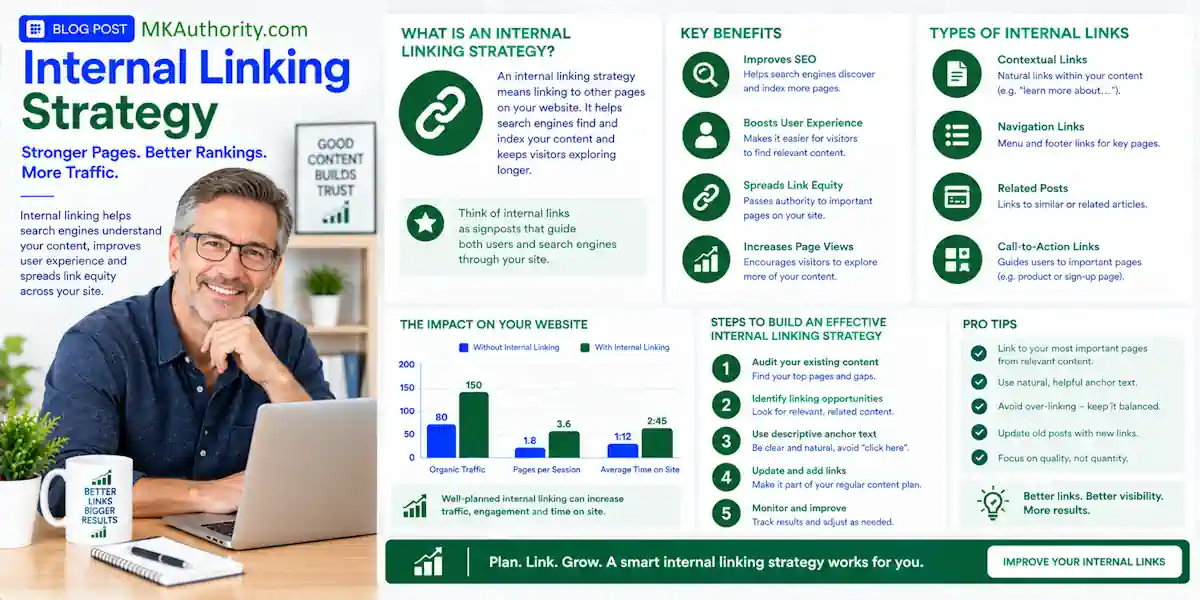

More affiliate content doesn’t automatically mean more affiliate traffic. If your best review, comparison, or buyer guide is buried three layers deep, it can sit there for months without getting the attention it deserves. A solid internal linking strategy is a practical search engine optimization tactic within a broader SEO strategy.
It clarifies your site architecture for readers and search engines. You are not trying to push people around your site. You are helping them move from a beginner question to a confident buying decision.
Here is how to build that path as a practical starting point for affiliate SEO sites, without turning every page into a wall of forced links.
Key Takeaways On Internal Linking Strategy
- Give every important page one clear job, whether it is a beginner guide, comparison, review, or commercial page. This improves the user experience.
- Use internal links to connect broad informational posts with the next question readers naturally have, then guide them toward useful buying content.
- Use descriptive anchor text, but don’t repeat the same exact phrase every time.
- Audit old posts for orphaned pages, broken URLs, redirects, and pages competing for the same search intent.
- Track affiliate clicks, leads, refunds, reversals, and cleared commissions to evaluate SEO performance. Traffic alone doesn’t pay the bills.
What Internal Links Actually Do for Affiliate Sites

An internal link goes from one page on your website to another page on the same website. A link from your blog post to an affiliate merchant, YouTube video, or software vendor is an external link.
That difference matters. Internal links help readers and search engines find your own content. Affiliate links send readers away from your site, usually to a merchant or offer page.
Internal links are not affiliate links
Think of internal links as the signs inside your own shop. They tell visitors where to go next. Your affiliate link is the door that leads to someone else’s checkout page.
A good article can use both. A beginner guide may internally link to a comparison. That comparison can link to a detailed review. Then, when the reader has enough information, the review can include a disclosed affiliate recommendation.
If you are still deciding whether to send visitors directly to a merchant or through your own content first, see this guide on direct linking versus bridge pages. The right path depends on traffic temperature, offer complexity, and how much trust the sale requires.
Contextual links carry the real value
Navigational links in menus, category pages, footer links, and breadcrumbs all help. But contextual links inside the body of a relevant article often do more for the reader and user experience.
Someone reading “how to choose an email autoresponder” may want a link to “email marketing tools for beginners.” They probably do not need a random link to a traffic exchange or crypto review.
Google says crawlable links and descriptive anchor text help people and Google understand where a link leads. Clear, relevant links also improve crawlability. Keep that simple rule in mind. The link should make sense right where it appears.
A commercial page does not need links from every page on your site. It needs useful links from pages where readers are already close to the same decision.
Build an Internal Linking Strategy Around Buyer Intent
Affiliate visitors often start with a question, not a credit card. They search for help, compare choices, then look for proof before they buy.
Your site architecture should match that journey. That is where an internal linking strategy becomes more than an SEO task. It becomes part of your pre-selling process.
Give each page a clear role
Start by listing your existing pages in a spreadsheet. Add the main topic, search intent, page type, affiliate offer, and the next page a reader should see.
Most affiliate sites need four basic page roles:
- Beginner guides answer broad questions and bring in early-stage traffic.
- How-to posts solve one focused problem and build trust.
- Comparison pages help readers choose between real options.
- Reviews and buyer guides help readers make a commercial decision.
Don’t make one post try to do all four jobs. A beginner tutorial that turns into a hard sell halfway through feels messy. A review that spends 1,500 words explaining basic definitions may miss the buyer’s real question.
Use a pillar page and a focused topic cluster
Topic clusters group related pages around one focused subject. Pillar pages are broad hub pages that act as cornerstone content for the topic. Each pillar page serves as the site’s content hub, while narrower guides, comparisons, and reviews become supporting content.
This model is part of a broader SEO strategy. A well-structured cluster covers more of the subject and builds topical authority over time.
Internal linking strategy: a simple example for an affiliate site focused on email marketing tools.
| Page | Reader question | Internal links to add |
|---|---|---|
| Email marketing for home businesses (pillar page) | Where do I start? | Beginner setup, list-building guide, tool comparison |
| How to start an email list (supporting page) | What is my first step? | Pillar page, beginner tool comparison |
| Email tool comparison for beginners (supporting page) | Which tool fits my budget? | Individual tool reviews, pricing guide |
| Tool A review (supporting page) | Is this tool right for me? | Comparison page, setup tutorial |
| Email automation examples (supporting page) | What can I send after signup? | Pillar page, beginner tool guide |
Pillar pages link to every supporting page that belongs in the cluster. Supporting pages link back to the pillar where it helps orientation. They can also link sideways when the next question is obvious.
Use keyword research to plan those topics before you publish a pile of disconnected posts. A practical SEO content strategy guide can help you map the cluster before you start writing.
Send Authority Toward Pages That Can Produce Revenue
Not every page needs to make money directly. In fact, trying to force an offer into every article is one fast way to lose reader trust.
Your educational content earns attention. Your commercial content includes money pages that help qualified readers make a decision. Internal links connect the two.
Start with pages already getting attention
Open Google Search Console and find posts with impressions, clicks, or rankings that are close to page one. Those pages already have a signal. Improve them before you chase another random keyword.
Add links to the most relevant comparison, review, or buyer guide. Do it where the reader would naturally want more help.
For example, a post about “how to build an email list” can mention that choosing a tool is the next step. Link that sentence to your beginner comparison page. Do not add three different tool links before you have explained what the reader needs.
Traffic around reviews, pricing, comparisons, and bonuses often has stronger buyer intent than broad curiosity traffic. If people click but never take action, these tips for fixing affiliate clicks that do not convert can help you check whether the page matches the visitor’s intent.
Pass link equity without making the page feel pushy
Internal links can pass link equity, sometimes discussed in relation to page rank or PageRank. Unlike external link building, this happens within your site rather than through external links. Stronger pages may help pages that need more discovery, but do not treat every link like a vote you must squeeze from a page.
Link to the page you want readers to find because it is the best next resource. If a high-traffic tutorial naturally supports your comparison page, add the link. If it does not, leave it out.
A helpful internal link improves the user experience and feels like advice. A forced one feels like a detour.
Use Anchor Text That Tells Readers What They Get
Anchor text is the clickable wording in a link. It should tell readers what they will find before they click.
That sounds basic, but vague anchors still appear everywhere. “Click here,” “this post,” and “read more” give people almost nothing to work with.
Be descriptive, not robotic
Use phrases that describe the destination honestly:
- “compare email tools for beginners”
- “see the full ConvertKit review”
- “learn how affiliate SubIDs work”
- “check the beginner list-building setup”
Google’s link-architecture guidance makes the same point. Descriptive anchor text helps users and search engines understand the linked content.
You can use relevant keywords in anchor text. Just don’t use the identical keyword phrase on every link. Natural variation is better, and it reads better too.
Match the promise to the destination
Never link “best email tool for beginners” to a general post about email marketing. That creates a poor click experience and weakens the user experience.
A clear match between the wording and destination also supports SEO performance. Readers know what to expect, and the page is more likely to satisfy that intent.
Likewise, do not point readers to a product review if the page is only a short feature list with no real opinion, drawbacks, screenshots, or buyer guidance. Affiliate readers can spot recycled merchant copy fast.
If you recommend a tool, explain who it is for, who should skip it, what it costs, and where it falls short. Then the internal link has a real reason to exist.
Keep Important Pages Easy to Find
A page can be well written and still get ignored if nothing links to it. These forgotten URLs are often called orphaned pages.
Your most valuable content shouldn’t depend on a search engine guessing where it belongs.
Watch crawl depth and site paths
Crawl depth means how many clicks it takes to reach a page from a major entry point, such as your homepage or category hub. There’s no magic number, but important pages should be easy to reach through a short, logical path.
A reader should be able to move from a broad pillar page to a guide, comparison, or review without digging through five category archives. That path also helps a Google crawler discover important pages.
Use category pages and navigation for broad structure. Then use contextual links inside articles for the real journey. That combination helps crawlability and makes the site less frustrating for real people.
Do not let redirects and dead pages pile up
Old affiliate sites collect clutter fast. Products disappear. Programs close. URLs change after a redesign, creating redirect chains. A page gets merged, but old internal links still point to a redirect.
Run a regular crawl with a tool such as Screaming Frog or Semrush Site Audit. Look for broken internal links, redirect chains, orphaned pages, and old URLs with no clear role.
Prioritize orphaned pages with useful content before creating new URLs. Use a 301 redirect only when one page has permanently moved into another page. If two posts answer the same search intent, merge the useful content into the stronger page, redirect the weaker one, and update internal links to the surviving URL.
Audit Your Internal Links Without Overcomplicating It
You do not need expensive software or a massive team to clean this up. A spreadsheet, Google Search Console, and a proper crawl will take you a long way.
For a small affiliate blog, run a monthly site audit as a sensible routine. Check priority pages weekly if you are sending paid traffic or promoting time-sensitive offers.
Use this quick audit checklist
- List your posts, category pages, content hub pages, reviews, comparisons, and pillar pages.
- Mark each URL as informational, commercial, or outdated.
- Find orphaned pages with no internal links pointing to them.
- Replace internal links that point to redirects or 404 pages.
- Check whether related posts link to the page you want to rank.
- Remove links that send readers to unrelated or expired offers.
- Use keyword research to find duplicate pages targeting the same buyer question.
- Add a useful next-step link when a reader reaches the end of a major section.
Avoid the common affiliate internal linking strategy mistakes

The biggest mistake is adding links simply because you think more links mean better SEO. They do not. A useful internal-linking system supports navigation and relevance, while link building earns authority from other websites.
Another bad habit is linking every post to the same offer page. That creates a poor user experience and can make the site feel like one long sales funnel. A better approach is to link readers to the page that helps them make their next decision.
Also, don’t build thin topic clusters. Six to eight useful supporting pages are better than 30 short articles repeating the same advice with slightly different headlines. Repetitive articles rarely build topical authority.
Measure Internal Links by Actions, Not Just Rankings
Rankings and organic traffic are useful measures of SEO performance, but they are not the finish line.
A page that gets 5,000 visitors but produces no affiliate clicks, leads, or sales may need a better path. Another page with 200 visitors may be a quiet winner because it sends highly qualified readers to an offer.
Track the route readers take
Use Google Analytics 4 to review landing pages, engagement, and movement toward your comparison or review pages. In Search Console, watch impressions, clicks, queries, and the pages gaining visibility.
Then compare those numbers with your affiliate network data. Track outbound clicks, leads, approved sales, refunds, reversals, and cleared commissions.
For closer placement data, use an affiliate SubID tracking guide to label the page, link position, and call to action. Internal links guide visitors through your site. SubIDs help show which outbound affiliate placement earned the click or sale.
Review winners and weak spots weekly
Organic traffic moves slower than paid traffic, so review content performance on a steady schedule instead of changing everything every day. A weekly check is enough for most active affiliate blogs.
Use an affiliate campaign scorecard template to compare pages and traffic sources without mixing every number into one confusing bucket.
When a page earns impressions but few clicks, improve the title and search intent match.
If it gets clicks but readers never reach the commercial page, add a better contextual internal link.
When affiliate clicks rise but cleared commissions fall, check the offer, audience fit, and refund patterns.
FAQ About Internal Linking for Affiliate Websites
How many internal links should I add to one page?
There is no universal number. Add enough links to help readers move through the topic, but not so many that they become a distraction or damage the user experience.
A 2,000-word guide may need several relevant internal links. A short review may only need two or three. Relevance beats a quota every time.
Can internal links help a review page rank?
They can help search engines discover the page and understand how it fits within your site’s topic structure. Links from relevant guides, comparisons, and pillar pages can also send real visitors to the review.
They do not guarantee rankings. The review still needs useful content, honest limitations, current information, and a clear match for the searcher’s intent.
Should every cluster page include an affiliate offer?
No. Some pages should only educate, answer a beginner question, or solve a small problem. These pages build trust and guide the reader to the next helpful resource.
Add a recommendation when it fits the decision the reader is making. One honest offer after useful advice works better than repeated sales links every few lines.
Build the Path Using Internal Linking Strategy Before You Chase More Posts
The goal isn’t to link every page to every other page. The goal is to build a clear route from question to answer, then to the right buying decision. This improves the user experience.
Start with one focused topic. Connect your strongest informational posts with internal links to useful comparisons and reviews. Keep every link natural, descriptive, and helpful.
That’s the practical side of search engine optimization. An internal linking strategy turns a collection of affiliate posts into a site readers can trust and search engines can understand.
Easily automate blog posts that rank on Google & ChatGPT – Visit RightBlogger