 Malcolm Keith 2026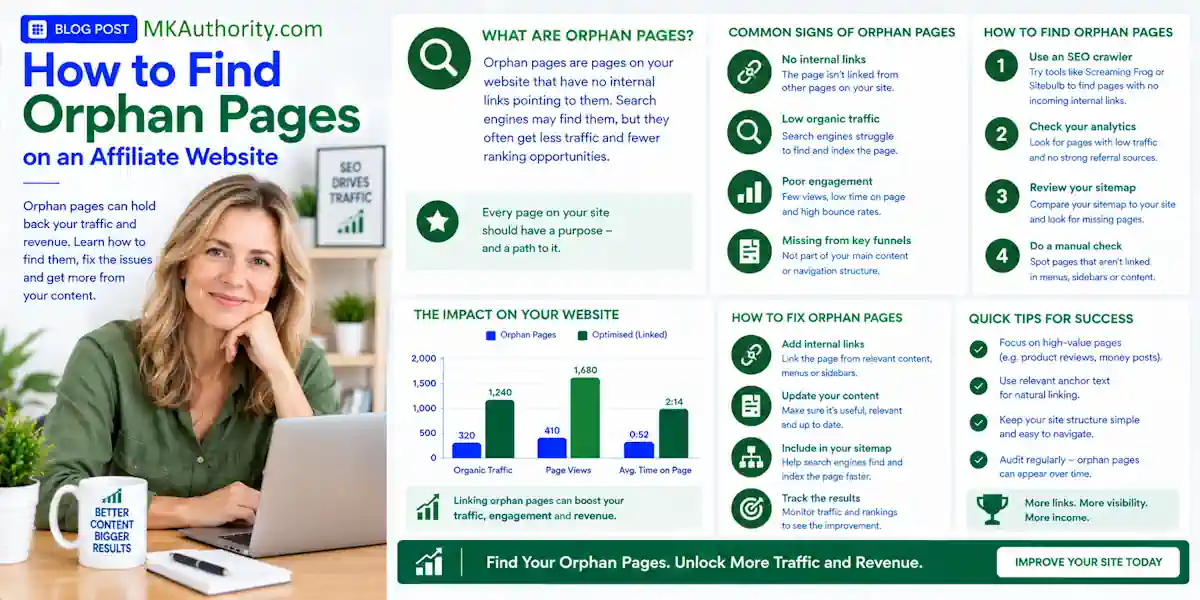

A great affiliate review cannot earn rankings, clicks, organic traffic, or commissions if nobody can find it. That is the simple problem with orphan pages. If you want to find orphan pages on an affiliate website, you need more than one quick crawl.
You need to compare the pages your site links to with the pages Google, your sitemap, and your analytics know about. Then you can decide which URLs deserve a real fix and which ones should stay out of search.
Key Takeaways On How To Find Orphan Pages
- An orphan page has no incoming internal links, so visitors and search engine crawlers may struggle to reach it.
- A reliable site audit compares a full crawl with your XML sitemap, Google Analytics 4, and Google Search Console data. One source alone isn’t enough.
- Prioritize orphaned review pages, comparisons, tutorials, and lead pages that have traffic, backlinks, affiliate clicks, or conversions.
- Don’t add random links simply to make an SEO tool happy. Add relevant links with descriptive anchor text to help real visitors continue their journey.
- Some paid ad and email landing pages are intentionally isolated. They still need a clear job, good copy, and the right indexability settings.
What Counts as an Orphan Page?

An orphan page is a URL with zero internal links pointing to it. Your homepage, category pages, blog posts, related-post blocks, menus, and other site pages form your site structure, but don’t link to it.
That does not always mean search engine crawlers will never see the page. They may discover it through an xml sitemap, an old external backlink, or prior crawling. Still, the URL sits outside your website architecture.
A page can be live but hard to reach
Think about an old product review you published two years ago. It may still be indexed and even get a few impressions. But if you removed its category link, deleted the related post section, and never linked to it from newer content, it has become isolated.
That page might have useful comparisons, affiliate clicks, or backlinks. If so, leaving it buried is wasted opportunity.
Internal links help readers move through your content. They also help search engines discover URLs and understand which pages matter most on a topic.
Intentional campaign pages are different
Not every isolated page is a mistake. Paid traffic landing pages may have no navigation on purpose. An email opt-in page may also be built to keep the visitor focused on one action.
That can be fine. Your affiliate bridge page setup guide can help you build pages that add real value before a visitor clicks an offer.
The important question is simple: does this URL have a job? A page built for subscribers or paid ads may be noindexed and lightly linked. A review meant to rank in Google should not be hidden away like that.
Why Orphan Pages Can Hurt Affiliate Results
Affiliate sites often grow fast. You publish reviews, bonus pages, comparisons, tutorials, traffic posts, and campaign pages. Then a redesign, WordPress category change, or expired offer leaves old URLs behind.
The result is a site with content you paid for or worked hard to create, but no clear path to reach it.
Search engines get weaker signals
A crawler usually discovers a site by following links. When an important URL has no internal links, it receives less context about its topic and place on the site.
It also misses out on link equity. Internal links can distribute relevance and authority signals, but they aren’t a direct PageRank control and don’t guarantee rankings.
A “best email marketing tools” roundup should use descriptive anchor text when linking to individual tool reviews. Those reviews should link back to the comparison where it makes sense. That is useful internal linking, not a linking trick.
Visitors miss the next logical page
Poor site structure costs more than rankings. A reader may land on your beginner traffic guide but never discover your detailed review of the tool you recommend.
That is a missed chance to build trust and a missed affiliate click.
A page with no internal links may still get indexed, but it has no clear route for a visitor who is already reading your site.
Don’t link low-value pages everywhere to inflate crawl signals. Connect pages only when the destination answers the next question your reader is likely to have.
How to Find Orphan Pages Reliably
The most reliable site audit uses a comparison. SEO crawlers model what web crawlers can discover through your current link path. Compare URLs revealed by internal links with those found in outside discovery sources.
Any URL appearing in a sitemap, Analytics, or Search Console but missing from your internal crawl is a possible orphan page.
Start with a full internal crawl
Run a crawl of your site with Screaming Frog SEO Spider or another trusted crawler. Start from the homepage and allow the crawler to follow normal internal HTML links.
This gives you the list of pages a visitor or search crawler can reach through your current site structure. It is your baseline. On larger sites, identifying unnecessary or isolated URLs can help review crawl budget efficiency.
Screaming Frog can also crawl XML sitemaps independently or alongside a normal crawl, as explained on the SEO Spider product page. That matters because sitemaps often contain URLs your navigation no longer exposes.
Add your other URL sources
Your XML sitemap is a strong starting point, but it isn’t perfect. Old sitemap entries can linger after a migration. Some important pages may also be missing from it.
Google Analytics 4 can uncover pages people actually visited. Google Search Console can show pages that received impressions or clicks. Search Console doesn’t offer a native orphan-page report, so use it as a discovery source, not the final verdict.
A simple audit sheet can keep the process clear:
| URL source | What it can reveal | What to check |
|---|---|---|
| Internal crawl | Pages linked within your site | Incoming internal links |
| XML sitemap | URLs you want search engines to know | Whether the URL is still valid |
| Google Analytics 4 | Pages with recorded visits | Traffic and engagement |
| Search Console | Pages with impressions or clicks | Indexing and search value |
The URLs found outside the crawl deserve review. They aren’t all confirmed orphan pages yet.
Find Orphan Pages With Screaming Frog
The crawler gives you one of the most practical ways to run this audit. Its interface can change over time, but the core process stays the same: connect your data sources, crawl the site, run crawl analysis, and inspect the orphan URL reports.
The official Screaming Frog orphan-page tutorial walks through using XML sitemaps, Google Analytics, and Google Search Console together.
Configure your crawl sources
Open the Spider configuration and enable crawling of linked XML sitemaps. Then connect Google Analytics and Search Console through the API Access area before crawling.
Once the crawl finishes, run Crawl Analysis. This step lets the tool compare URLs found through your sitemap and connected Google data against URLs discovered through internal links.
You can then review orphan URLs under the relevant Sitemap, Analytics, or Search Console reporting areas. The Search Console orphan URL issue guide also explains how to review and export those findings.
Verify every result before fixing it
Don’t rush to add links because a tool flags a page. First, open the live URL and search your site for links that the crawler may have missed.
JavaScript links, links blocked by crawl settings, password-protected content, and unusual templates can cause false positives. Ahrefs also warns that its crawler can report a page as orphaned when it simply did not see internal links during that audit.
Confirm these points before you act:
- The URL returns the expected status code and loads correctly for visitors.
- No crawlable internal link points to it from a live page. Inspect the source page and anchor text for any link the crawler may have missed.
- The page is canonicalized correctly, and any noindex tag matches its purpose.
- It has a clear business or search purpose.
That is how you separate a real problem from a report that needs more investigation.

Prioritize the Pages That Can Produce Results
A large affiliate site can have dozens or hundreds of orphan URLs. You don’t need to fix every URL first. Start where a repair can protect traffic, trust, or commissions.
A forgotten thank-you page is usually less urgent than a high-intent comparison page with backlinks.
Put valuable pages at the top
Sort your list using real evidence. Check organic traffic, clicks, and impressions in Search Console. Review sessions and conversions in Analytics. Together, these signals show which repair could improve SEO performance first.
Look at backlinks, affiliate-link clicks, approved conversions, and cleared earnings per click if you track them.
A page with 30 monthly organic clicks and consistent sales may be more valuable than a broad post with 2,000 curiosity visits.
Give priority to:
- Product reviews, comparisons, and buying guides with clear search intent.
- Pages with good backlinks, existing link equity, or visibility in search results.
- Content that produces affiliate clicks, leads, or cleared commissions.
- Strong articles with original testing, screenshots, examples, or useful advice.
Be honest about weak content
An orphan page may be isolated because it is no longer useful. Old bonus pages, discontinued offers, copied merchant descriptions, and thin promotional posts shouldn’t be rescued automatically.
Google’s spam policies address thin affiliation, so a page with little beyond an affiliate button needs more than one new internal link. Improve it with original proof and useful context, merge it into a stronger page, or retire it.
Retaining too many thin or obsolete URLs can also create index bloat. More indexed pages don’t automatically mean more affiliate income.
Fix Orphan Pages Without Creating New Problems
Once you confirm the page is genuinely orphaned, choose the smallest sensible fix. The right answer depends on the page’s purpose, quality, and value.
Add relevant internal links for pages worth keeping
Link to a strong review from a related tutorial, comparison, category page, or resource hub. Use anchor text that naturally describes the destination and tells readers what they will find.
For example, a post about list building could link to “email marketing tools for beginners.” A traffic article could link to a relevant tracking tool review. Do not force the same page into unrelated articles.
Also update navigation paths where needed. If a comparison is part of a topic cluster, it may deserve a category link, related-post mention, and internal links from the individual reviews it compares. Check the page’s indexability after updating those paths.
Merge, redirect, noindex, or delete
If two pages answer the same search question, keep the stronger URL and merge the useful material. A closely matched consolidation can help preserve relevant link equity and authority signals.
Use 301 redirects only when the destination is a close match for the old page’s intent.
A discontinued product review might redirect to an updated review or a closely related replacement. It shouldn’t redirect to your homepage just because that is easy.
Add a noindex tag to a page that must remain live for ad traffic, subscribers, or customers but has no realistic search purpose. Remove noindexed URLs from the xml sitemap and avoid treating them like key organic assets in your navigation.
After any change, test the live URL, check the response code, confirm the directive, review indexability, and run another crawl.
Stop New Orphan Pages Before They Pile Up
The easy win is making orphan-page checks part of normal publishing and your ongoing SEO strategy. This is far better than discovering a mess after a redesign.
Use a simple publishing checklist
Before a new review, tutorial, or comparison goes live, decide its main topic, search purpose, category, and at least two relevant internal links with descriptive anchor text.
One link should point into the new article from an existing related page. The other should point from the new article to a useful next step. This gives the URL a place on your site without turning every post into a cluttered link farm.
If you promote one offer across several pages, use affiliate SubID tracking to identify the source page and placement. That data helps you see which pages deserve continued attention.
Audit after migrations and major updates
Website migrations create orphan pages fast. Menus change, categories disappear, old URLs are redirected, and templates lose related-post links.
Before making major changes, export your URLs and record traffic, backlinks, canonical targets, indexability, and the decision for each page. After launch, run a post-migration site audit and compare the pre-launch and post-launch URL inventories.
For a smaller affiliate site, a monthly crawl is usually enough. Review priority pages weekly after migrations, content updates, or major template changes if you run paid traffic, update offers often, or publish at a high volume.
Frequently Asked Questions On How To Find Orphan Pages
Can an orphan page still rank in Google?
Yes. Google may find an orphan page through an XML sitemap, an external backlink, or a prior crawl. But it has weaker internal discovery and relevance signals than a well-connected page, so it is not a good long-term setup for an important affiliate article.
Should every orphan page get an internal link?
No. Link only to pages that deserve a place in your content structure. A thin page, expired offer, duplicate review, or ad-only landing page may need a merge, redirect, noindex directive, or removal instead.
Does Google Analytics find all orphan pages?
No. Analytics can only show URLs that recorded visits or events. A page with no traffic will not appear there. That is why you should combine Analytics with a sitemap, Search Console data, and a full internal crawl.
Final Thoughts
To find orphan pages, compare what your site links to with the URLs Google, your sitemap, and your analytics can see. Then verify every result before changing anything.
Connect useful pages with relevant internal links and descriptive anchor text, retire weak pages with care, and keep the process going every time you publish or redesign.


