Malcolm Keith 2026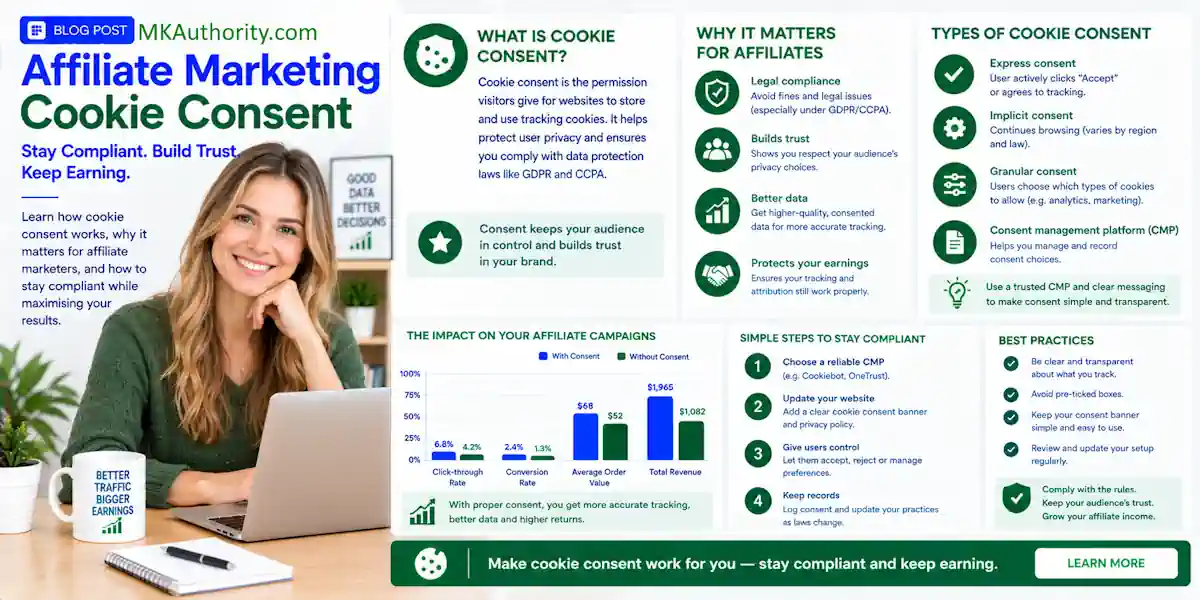

I recently added a plugin to this website to cater for affiliate marketing cookie consent to try and keep me inside the legal environments for different countries.
A cookie banner can protect your WordPress site, but it can also stop the tracking that pays your affiliate commissions. That may affect your conversion rate when clicks come in but sales reports look strangely low.
Affiliate marketing cookie consent isn’t about throwing up a popup and hoping for the best. You need a tool that blocks the right scripts, records visitor choices, and still gives your partners the cleanest possible affiliate tracking setup.
Let’s look at what matters, which WordPress tools are worth considering, and how to test consent and attribution before real traffic costs you credit for sales.
Quick takeaways on affiliate marketing cookie consent for affiliate site owners
Consent obligations depend on where your visitors live, what your scripts collect, and how your affiliate program tracks referrals. A banner alone isn’t the whole job.
Here are the big key points about affiliate marketing cookie consent to remember:
- Affiliate cookies are usually treated as non-essential marketing cookies, especially for visitors in the UK and EEA.
- A cookie set by your own site may be more durable than one set by an outside service, but it doesn’t remove privacy duties.
- Google Consent Mode v2 can help control Google tags, but it doesn’t magically restore commissions lost by an affiliate network.
- Cookiebot and Complianz are practical WordPress choices because they offer scanning, prior blocking, regional settings, and consent records.
- Keep your cookie policy, privacy policy, and affiliate disclosure visible. They each do a different job.
- Test both “Accept All” and “Reject All” paths before sending paid traffic to a page.
The biggest mistake is blocking every tracking script, then assuming your affiliate network has a server-side backup. Check it. Don’t guess.
What affiliate marketing cookie consent means on WordPress
Affiliate links can look simple. Someone clicks your link, buys a product, and you earn a commission. Behind that process, several systems may pass click IDs, browser cookies, referral codes, or conversion events.
Affiliate cookies are rarely strictly necessary

Strictly necessary cookies usually help a website function. Think WordPress login cookies, security cookies, shopping cart sessions, or a cookie that remembers a visitor’s consent preference.
A referral cookie normally tracks a sale so a publisher can receive commission later. That’s useful for your business, but it usually isn’t required for visitors to read your article or use basic site features.
That is why most such cookies should be placed in a marketing or statistics category, not the essential category. The discussion around strictly necessary affiliate cookies makes the point clearly: the exemption is narrow.
Your cookie tool should also explain what happens. A useful WordPress cookie policy guide can help visitors understand categories, purposes, cookie duration, and retention periods without burying the details.
First-party cookies, third-party cookies, and postbacks
A first-party cookie is set by the domain the visitor is currently viewing. For example, your own WordPress site may save a click ID after someone lands on a review page.
A third-party cookie is set by a different domain, often an ad platform, analytics provider, or affiliate network. Modern browsers have limited these cookies more aggressively, which can make older tracking methods unreliable.
Server-to-server tracking, often called a postback, works differently. The merchant sends a conversion event back to the tracking platform using a click ID or transaction reference. Tracking technologies and the browser are less central to the final conversion report.
That doesn’t mean “no cookie, no consent problem.” Click IDs, IP addresses, email addresses, and hashed identifiers can still involve personal data. A postback or click ID doesn’t automatically establish legitimate interest. Keep the data small, explain the purpose, and only send the fields your network really needs.
EU, UK, and US rules are not the same
You don’t need to become a privacy lawyer to run an affiliate site. But you do need a practical legal framework when traffic comes from several countries.
Responsibility may be shared across the publisher, merchant, and affiliate network. Depending on the arrangement, one or more parties may act as a data controller. This practical information isn’t legal advice, so consult a qualified legal professional about your compliance requirements.
EU and UK visitors usually need prior consent
For EU and UK visitors, GDPR is a key data protection regulation. It works alongside the ePrivacy Directive and PECR, which are privacy and electronic communications regulations.
The usual cookie rules for non-essential tracking are simple: ask before cookies or scripts fire. Affiliate cookies are commonly treated as non-essential because they support referral tracking rather than core site functions.
That means your consent management platform should block affiliate pixels, marketing scripts, retargeting tags, and non-essential analytics until the visitor agrees. A banner that loads those tags first and asks later isn’t doing the job.
Affiliate cookie consent requirements are often stricter than beginner marketers expect. “Legitimate interest” isn’t a quick replacement for consent when you’re storing or reading non-essential cookies.
A legitimate interest assessment may apply to some processing activities, but it isn’t automatically a substitute for prior consent. The answer depends on the specific activity, its purpose, and the applicable rules.
US privacy rules often focus on notice and opt-out
US rules vary under state privacy laws. California’s CCPA and CPRA generally focus more on notice, consumer rights, and opt-out mechanisms for certain data sales, sharing, or targeted advertising.
That’s different from a broad EU-style prior opt-in model. Still, don’t read that as permission to hide trackers. Your privacy policy should say what you collect, why you collect it, and which providers may receive it.
The practical comparison in GDPR vs. CCPA cookie requirements is helpful when your affiliate blog attracts both US and European traffic.
Best cookie consent tools for affiliate sites on WordPress
The right consent tool needs to work with your actual tags, not just display a polished banner. Cookie scans, prior blocking, regional rules, and Google tag controls matter more than flashy colors. A consent management platform should also detect the scripts, redirects, and tags used for affiliate tracking.
| Tool | Consent and blocking | Scanning and regions | Google Consent Mode | Pricing and fit |
|---|---|---|---|---|
| Cookiebot | Prior blocking and consent categories | Automatic scan, GDPR and CCPA support | Supports Consent Mode v2 | Check current free limits and paid pricing by domain and subpages |
| Complianz | Prior consent controls and script management | Hybrid scan, multi-region documents on premium plans | Consent Mode v2 on premium plans | Check current plans and site limits before purchasing |
| OneTrust, CookieYes, iubenda | Check the current plugin plan and script controls | Verify scan depth and regional coverage | Confirm your version supports it | Compare current pricing and features before committing |
The table gives you the short version. The next step is matching the tool to your traffic and tracking stack. Regional settings should account for GDPR, CCPA, and relevant state privacy laws without assuming any product guarantees compliance.
Cookiebot for automated scanning and Google tags
Cookiebot is a solid option when you want automated cookie discovery and a WordPress-friendly consent setup. It can scan pages, categorize affiliate cookies, block selected technologies before consent, and support regional rules.
It also supports Google Consent Mode v2. That matters if you use Google Analytics, Google Ads, or Google Tag Manager alongside affiliate promotions. See how Cookiebot works with Google Consent Mode before you turn on the integration.
Cookiebot pricing and free-plan limits can change, so verify them against your current domain and subpage count. A large archive of old posts can change the cost quickly. Also confirm that the setup accommodates first-party cookies if your site uses them.
Complianz for hands-on WordPress control
Complianz is popular with WordPress site owners because its setup stays close to the WordPress dashboard. Its scan combines WordPress-level checks with simulated visits, which can catch cookies that only appear after scripts load.
Premium features may include full-site scanning, records of consent, Geo IP banners, regional legal documents, and Google Consent Mode v2. Check the current feature list and pricing before choosing a plan.
Both Cookiebot and Complianz can work with affiliate links, redirects, and tracking platforms. But neither can promise compatibility with every affiliate network. ClickBank, ShareASale, Impact, Awin, PartnerStack, and Rewardful can all use different tracking flows, plans, and script requirements.
Test the banner’s technical behavior and user experience before sending traffic. A correct setup can still affect your conversion rate if it blocks important content or makes consent confusing.
Set up your WordPress consent tool the right way
Don’t install a plugin, accept the default settings, and call it finished. The setup needs to match your tags, links, traffic sources, and applicable compliance requirements.
Build a real inventory before you categorize scripts
Start by listing every plugin, tag, pixel, embedded video, heatmap, form tool, and affiliate widget on your site. Document each cookie’s purpose and cookie duration, then scan your pages while logged out.
Check your homepage, blog posts, comparison pages, opt-in pages, thank-you pages, and any landing pages used for Google Ads or solo traffic. A tag may load only on one template.
Use categories that make sense:
- Put login, security, cart, and consent-preference cookies under essential only when they are truly needed.
- Put Google Analytics, session replay, retargeting pixels, and affiliate tracking scripts in statistics or marketing.
- Block non-essential scripts until the visitor gives the relevant user consent.
- Add a footer link so people can reopen their preferences later.
- Check regional settings against applicable state privacy laws.
- Update your privacy policy and cookie policy whenever a new tool or network is added.
Don’t use categorization to treat marketing tracking as essential without an appropriate legitimate interest analysis.
For email capture pages, keep consent clear and separate from cookie choices. This affiliate opt-in page guide has a useful reminder: don’t pre-check marketing boxes or hide the fact that you will email people.
Keep affiliate disclosures separate from cookie consent
Cookie consent concerns tracking technologies. An affiliate disclosure explains that you may earn a commission if someone buys through your links. One never replaces the other.
Place a plain-language disclosure near the first affiliate link, button, product table, or recommendation. Don’t hide it at the bottom of a long page.
You can use these FTC affiliate disclosure examples to create wording that is direct, visible, and easy to understand. Get qualified legal advice for decisions that depend on your jurisdiction.
Protect attribution without pretending consent loss does not exist
When a visitor rejects marketing cookies, some browser-based attribution, including affiliate cookies, will be lost. That is not a reason to ignore consent. It is a reason to make your tracking setup less dependent on one browser cookie.
Google Consent Mode is not affiliate attribution
Google Consent Mode v2 sends consent choices to Google tags. It can adjust how Google Analytics and Google Ads behave based on the visitor’s decision.
It does not tell your affiliate network to award a commission. If an Impact, Awin, or ClickBank tracking cookie needs consent and the visitor rejects it, Consent Mode does not repair that relationship.
Check whether your affiliate network supports first-party tracking, coupon attribution, click IDs, conversion APIs, or server-to-server postbacks. These options can support commission attribution when the network allows them. For subscription offers with changing payouts, send the actual server-returned commission value where the network allows it.
Use first-party cookies and server-to-server tracking where available
First-party cookies can save a referral ID on your own domain after consent. This differs from third-party cookies, which depend on another domain. Server-to-server tracking can then connect a completed conversion to that reference without relying only on browser storage.
A server-side method doesn’t automatically establish legitimate interest or another lawful basis for processing. Check the requirements that apply before using it.
Rewardful is one platform where attribution gaps can affect reported performance and conversion rate, especially when browser privacy tools block older tracking methods. This overview of Rewardful affiliate cookie tracking shows why the click and conversion path needs checking.
Don’t pass extra personal data because you can. Avoid sending raw email addresses, phone numbers, order details, or unnecessary IP data through your tracking chain. Retain records only as long as you need them.
Test your consent and affiliate tracking before buying traffic
A setup can look perfect in the WordPress dashboard and still fail in a real browser. Testing is where you find hidden problems.
Run reject and accept tests in a clean browser

Open an incognito window or a fresh browser profile. Clear cookies and local storage between tests.
First, load a key affiliate page and select “Reject All.” Open the browser’s developer tools and inspect the Network tab. Your blocked affiliate pixel, marketing tag, and non-essential analytics requests shouldn’t fire.
Then repeat the test and select “Accept All.” Click a test affiliate link, where your program allows it, and check whether the redirect works as expected. Look for the click ID, referral parameter, or network request.
Test persistence, regions, and mobile pages
Refresh the page after accepting or rejecting. The banner should remember your choice, and first-party cookies or other consent-dependent storage should behave correctly after refresh.
If your tool has regional targeting, test the EEA or UK experience, the US experience, and cases shaped by state privacy laws. A VPN can help simulate locations, but it doesn’t prove regional compliance. Also test your pages on mobile, where slow banners and blocked scripts can behave differently.
Review your reports after deployment. Compare outbound affiliate clicks with network clicks, approved conversions, and any measurable conversion rate change. Your affiliate conversion tracking guide can help you spot whether the break is on your WordPress site, the redirect, or the merchant checkout.
FAQ on affiliate marketing cookie consent
Do affiliate cookies require consent in the EU and UK?
Usually, yes. Affiliate cookies commonly support marketing attribution, so they generally aren’t treated as essential cookies. For visitors covered by GDPR, ePrivacy rules, or PECR, block them until the visitor gives valid consent.
Who is the data controller in affiliate marketing?
It depends on the data flow. You, the merchant, the affiliate network, and outside service providers may have separate responsibilities. The answer depends on who decides why data is collected and how it’s used.
Can I still use cloaked affiliate links?
Yes, if the affiliate program permits it. Link cloaking doesn’t replace a visible affiliate disclosure or applicable cookie-consent controls. It should never hide the affiliate relationship. Follow the program’s terms and use the practical advice in this affiliate link cloaking guide.
Final thoughts
A good WordPress consent setup doesn’t promise perfect attribution. It gives visitors a fair choice, blocks non-essential tracking when required, and helps you see exactly where data is being lost.
Use affiliate marketing cookie consent as part of your affiliate tracking system, not an annoying compliance box to tick. Clear disclosures, tested scripts, first-party methods, and postback options create a more resilient foundation for long-term affiliate income.