Malcolm Keith 2026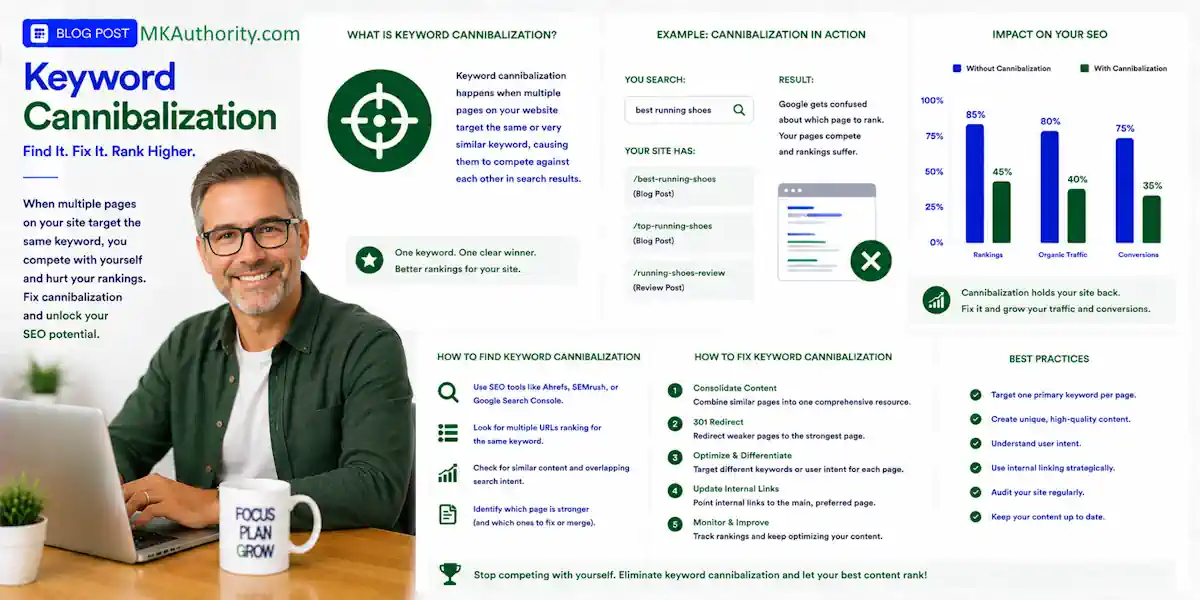

An affiliate site can gain more organic traffic, attract more clicks, and still make less money. That happens when several pages chase the same visitor with nearly the same answer, weakening SEO performance. Keyword cannibalization is often the reason.
In simple terms, keyword cannibalization happens when multiple pages on your website target the same keyword and search intent, causing them to compete against each other in search engine results.
You may have two product reviews, three “best tools” posts, and an old comparison page – all competing for the same search query.
The good news is you don’t need to start deleting posts. First, find the real overlap, assign each URL a distinct purpose based on search intent, then make the strongest page the obvious choice.
Key Takeaways
- Keyword cannibalization happens when multiple URLs target the same search intent, causing them to compete for rankings, clicks, links, and conversions.
- Similar keywords do not automatically create a problem; compare the visitor’s goal, page promise, and recommendation before changing a URL.
- Use Google Search Console, position tracking, analytics, and affiliate data to confirm meaningful overlap and choose the page with the strongest search and business value.
- Merge pages with the same intent, preserve useful long-tail content, and use direct 301 redirects when an old URL is truly finished.
- Prevent future overlap with an honest keyword map, clear page roles, descriptive internal links, and regular content audits.
What Keyword Cannibalization Means on an Affiliate Site

Keyword cannibalization happens when two or more URLs target the same or closely related query and share the same search intent. Google then has to decide which page belongs in the search results.
Sometimes Google picks one page. Other times, rankings rotate between pages as their ranking signals compete. Neither page builds enough steady authority, clicks, links, or conversions. This can make search visibility unstable.
Google doesn’t apply a named “keyword cannibalization penalty.” The problem is more practical. Your own site sends mixed signals about which page deserves to rank.
Similar pages are not automatically a problem
Two URLs can rank for the same broad phrase and still work well together. Similar pages aren’t necessarily duplicate content.
A “best email marketing software” roundup and a detailed MailerLite review may both appear for a broad email marketing query. One helps a buyer compare choices. The other helps a buyer decide whether one product is right for them.
That isn’t automatically a conflict. Visitors can get something different from each page.
Why affiliate sites run into this so often
Affiliate marketers often create content around every angle of an offer. You publish a review, an alternatives post, a pricing post, a discount post, a comparison, and a “best tools” list.
That is smart only when each page has a different job.
Content cannibalization is the broader issue. It means several pages repeat the same solution, proof, and recommendation, even if the exact keywords are different. Thin review templates and AI-written product pages can make content cannibalization grow fast.
Match Search Intent Before You Touch a URL
Don’t begin with a redirect. Begin with one plain question: what does the searcher want when they type these words?
Diagnose keyword cannibalization only after comparing the visitor’s goal across pages. Similar wording alone doesn’t prove that two URLs compete.
A keyword can look similar on a spreadsheet while the intent is completely different. That difference protects useful pages from being merged by mistake.
Commercial research is different from a product review
Someone searching “best email marketing software” is still comparing options. They want a shortlist, pricing context, strengths, weaknesses, and help choosing.
Someone searching “MailerLite review” has narrowed the field. They want a closer look at MailerLite, including who it suits, where it falls short, and whether the affiliate recommendation feels believable.
Each target keyword needs a clear page role. Record that role in your keyword mapping before changing a URL.
Search intent should guide the choice, even when the search results show similar wording. The landing page must match the decision the visitor is trying to make.
Here is how separate pages can earn their place:
| Keyword | What the visitor wants | Best page type |
|---|---|---|
| Best email marketing software | A shortlist of choices | Comparison roundup |
| MailerLite review | A decision about one tool | In-depth product review |
| MailerLite vs Kit | A direct side-by-side choice | Comparison page |
| Email marketing software for beginners | A beginner-friendly recommendation | Audience-focused guide |
The words overlap. The visitor’s decision does not.
Give every page one clear promise

A good commercial page needs a clear purpose before you write the title.
For example, “best VPN for streaming” can compare several services. A NordVPN review should focus on that single service. A NordVPN alternatives page should help readers who already know NordVPN but want other options.
An audience-focused guide should instead start with the reader’s needs and recommend suitable options.
If all three pages use the same introduction, same product table, same affiliate buttons, and same final recommendation, you may have keyword cannibalization. Rewrite the angle or consolidate the pages. Your content strategy should keep each page’s job separate.
Find Keyword Cannibalization in Google Search Console
Google Search Console gives the cleanest starting point for checking possible keyword cannibalization because it shows what searchers typed and which pages received actual impressions and clicks. That makes it useful for assessing search visibility.
Google’s Search Console overview explains the reports that help you measure clicks, impressions, and search performance. For this job, the Performance report is where you will spend most of your time.
Use the query-to-page workflow
Start with a stable date range, such as the last three months. If the site has seasonal traffic, compare the same period from the previous year when possible.
Then follow this simple process, using position tracking to compare URL performance over time:
- Open the Performance report and look for high-impression, non-branded queries.
- Click one search query that matters to your business, especially a buying-related phrase. Define the target keyword you’re investigating, then interpret its search intent before taking action.
- Switch to the Pages tab and check which URLs appeared for that query.
- Record clicks, impressions, click-through rate, and average position for each URL to assess SEO performance.
- Export the data when your site has many pages. Use a lightweight content audit to group rows by query and count the URLs attached to each one.
Look for cases where two URLs both receive meaningful impressions, but neither holds a strong position. Ranking swaps are another warning sign, but these patterns don’t prove a problem on their own.
Use site search and rank tools as a second check
Use site search by searching Google for site:yourdomain.com "target phrase" to spot pages that obviously cover the same topic. This is fast, but it is not proof of a problem.
Semrush, Ahrefs, Moz, and spreadsheet exports can also support position tracking and reveal overlapping rankings at scale. Still, Search Console tells you what Google has actually shown in search results for your own site.
For a large affiliate site, focus first on queries tied to review pages, alternatives pages, comparison pages, and money-making content. Fixing a low-value informational overlap can wait.
Decide Whether You Have a Problem, Not Just Overlap
Two URLs showing for one search query aren’t enough evidence. Google often tests more than one page in the search results, especially for broad terms.
You have a stronger case for keyword cannibalization when pages share search intent and cover the same products. Conflicting ranking signals add weight when they keep swapping positions in the search engine rankings, so use position tracking to confirm the pattern.
If two pages answer different buyer questions, they can both rank. If they answer the same question with the same recommendation, one page usually needs to lead.
Check what happens after the click, too. One landing page may get fewer visits but produce more affiliate link clicks, opt-ins, approved sales, cleared commissions, fewer refunds, or stronger EPC.
A high click-through rate can look awesome, but it isn’t the finish line. If a page attracts curious visitors who never click through or buy, it may not be the page you want to protect.
Prioritize pages where organic traffic, revenue, and search visibility are all at risk. A search query with 20 impressions isn’t where you start. A product category bringing regular clicks and affiliate commissions deserves attention first.
Pick a Winner Before You Fix Anything
When fixing keyword cannibalization, choose a winner before changing anything.
The oldest page isn’t always the winner. Neither is the longest URL or the page with the most words.
Choose the URL that best matches search intent and offers the strongest useful content. It should earn the better user response, create business value, and have a clear future role on your site.
Use this decision table before changing anything:
| What you find | Best move | What to avoid |
|---|---|---|
| Two pages have the same intent and recommendation | Merge them into one stronger page | Keeping both pages nearly identical |
| Pages overlap but target different buyers | Rewrite each page around its own intent | Forcing one page to serve both buyers |
| URLs are near-duplicates caused by filters or tracking parameters | Choose one preferred URL | Assuming all variations are interchangeable |
| An old deal or review page has no unique value | Retire it and point to the closest relevant page | Sending every old URL to the homepage |
| A page has useful long-tail traffic | Preserve that content in the surviving page | Deleting it without checking queries |
Review position tracking before changing URLs. Check the backlink profile and page authority too, but treat them as supporting evidence, not automatic reasons to preserve a page.
Compare organic traffic with affiliate-link clicks, approved conversions, refunds, reversals, and cleared EPC.
EPC means earnings per click. If one review page earns $1.20 in cleared commissions per click and a competing page earns $0.30, that is useful business data. Traffic has to help the business, not only make a chart look good.
Merge Competing Affiliate Content Without Destroying Useful Pages
When keyword cannibalization affects pages serving the same search intent, merging is often the strongest fix. Keep the better URL and turn it into the page that deserves to rank.
Do not paste two articles together and call it a day. That creates a long, messy page that answers everything badly and leaves duplicate content behind.
A focused merge also reduces content cannibalization, because one page handles the full decision.
Keep the material that earns long-tail traffic
Before you merge, pull the queries each URL receives. Look for valuable long-tail keywords from the weaker page, such as pricing questions, beginner concerns, alternatives, setup steps, or product limitations.
Review the retiring URL’s page authority and backlink profile before deciding what value to preserve.
Then build those useful details into the winning page.
A safe merge usually looks like this:
- Choose the final URL based on the reader’s decision and business value.
- Keep the strongest original copy, testing notes, screenshots, comparison points, and FAQs.
- Add useful sections from the retiring page where they improve the reader’s decision.
- Rewrite duplicated sections so the final article has one recommendation, one structure, and one clear call to action.
Before launch, update internal links to point to the surviving page.
Never claim personal product testing if you didn’t test it. Affiliate readers can spot copied feature lists a mile away.
Check affiliate links before the page goes live
Affiliate links can break during a redesign, redirect, plugin update, or URL migration. Save the links, link parameters, tracking IDs, and disclosures before changing the page.
Use rel="sponsored" for paid affiliate relationships, and put a clear affiliate disclosure near the first affiliate link. Don’t hide it at the bottom where readers miss it.
Track the surviving page separately after the merge. This affiliate sub-ID tracking guide can help you keep source, page, placement, and campaign labels consistent.
Reported commissions are encouraging. Cleared commissions after refunds and reversals tell you what the page is really worth.
Use 301 Redirects When One Page Is Truly Finished

Use 301 redirects when an old page permanently becomes part of another page. This can resolve keyword cannibalization by sending visitors and search engines to the surviving URL.
This works well when you merge two product reviews, retire a thin page, or replace an outdated page with a stronger version covering the same intent.
The destination must satisfy the original search intent, not merely match the topic. A visitor looking for a specific product review shouldn’t land on an unrelated category page.
Run this redirect checklist first
Before publishing a 301 redirect, check these items:
- Redirect the old page directly to the most relevant surviving URL.
- Update internal links, their anchor text, navigation links, sitemap entries, and canonical tags to point to the new page.
- Remove redirect chains, where one old URL sends visitors through several other URLs first. Direct redirects avoid wasting crawl budget.
- Test affiliate buttons, forms, tracking parameters, and mobile layouts on the destination page.
- Keep a record of the old URL, redirect date, and reason for the change.
After the redirect is live, watch traffic, conversions, and search engine rankings. Use position tracking with your analytics and affiliate dashboard. If the page gets clicks but affiliate sales disappear, check your setup with this affiliate conversion tracking guide.
When Canonical Tags or Noindex Are Better, and When They Are Not
Canonical tags and redirects aren’t the same thing. A redirect moves people and crawlers to another URL. A canonical tag tells Google which close duplicate URL you prefer. It’s a preference signal, not a universal fix for ranking signals.
Use canonicals for true duplicates
Canonicals work for near-identical URLs that represent duplicate content. Printer-friendly versions, tracking-parameter URLs, and duplicate product pages created by a site system are common sources of duplicate content.
Google’s guidance on consolidating duplicate URLs is clear on the main point: canonicalization is for duplicate or very similar pages. On large sites, resolving these duplicates can also preserve crawl budget.
Don’t use a canonical tag just because two pages share a keyword; shared wording alone isn’t proof of keyword cannibalization. A “best podcast hosting” roundup and a Buzzsprout review may overlap. Their search intent can still differ, so give them separate roles or make a content decision.
Use noindex only for pages that should not rank
Noindex removes a page from Google’s search results once Google crawls it and processes the directive. It doesn’t merge the page’s value into another URL.
Noindex tags can make sense for internal search pages, thin thank-you pages, duplicate print pages, or temporary campaign pages that you never want ranking.
It isn’t an easy fix for a useful review page with weak rankings. If you still want its links, authority, or useful content, merge it or improve it instead.
Repair Internal Links So Google Sees the Right Page
Internal links tell readers and search engines which page matters most. After resolving keyword cannibalization, update old links to match the intended search intent. Point them to the correct landing page, not the wrong URL.
Link to the winning page with descriptive anchor text that tells readers what they’ll find. For a roundup, use an anchor such as “best email marketing tools for beginners.” For a review, use the product name and review angle.
Stop sending mixed signals
Audit internal links across category pages, related posts, comparisons, and tutorials. Point them to the page you want to rank. Remove links to redirected URLs and vary your anchor text; avoid phrases like “read this” or “check it out.”
Also track where affiliate clicks come from. A page can gain more traffic while producing weaker EPC because visitor intent changed. Separate clicks by page, position, source, and offer so you can see what actually earns.
Prevent Cannibalization With a Keyword Map That Does Not Lie
The easiest fix for keyword cannibalization is prevention. Before publishing, use keyword mapping to check whether a page already serves the same purpose.
Your keyword map doesn’t need expensive software. A spreadsheet is enough for practical keyword mapping if you keep it current.
For each planned URL, record the target keyword, search intent, page type, target reader, products covered, supporting queries, internal links, preferred anchor text, and the page it shouldn’t overlap with.
Watch automated and AI-generated pages closely
Programmatic pages can multiply near-duplicates quickly, consuming crawl budget without adding value. AI can create content cannibalization when each prompt produces another generic review with a new product name.
Use site search to check for similar pages, then ask what changes for the buyer on each page. Is there a real product difference, price difference, use case, comparison, or audience need? If not, the page may not deserve its own URL.
Review new pages once a month with a simple content audit. Use position tracking, basic analytics, and your spreadsheet to see what is gaining traction, which pages share queries, and which affiliate pages earn cleared revenue.
Refresh proven winners before publishing another batch of similar ideas. This protects SEO performance and supports a durable content strategy built around useful long-tail keywords and sound search engine optimization.
Frequently Asked Questions
What is keyword cannibalization?
Keyword cannibalization happens when two or more URLs target the same or closely related query with the same search intent. Google may rotate the pages in search results instead of seeing one clear page to rank.
How can I tell whether two pages are cannibalizing each other?
Check Google Search Console to see whether multiple URLs receive impressions and clicks for the same query. Stronger evidence includes shared search intent, similar recommendations, unstable rankings, and competing pages that both have business value at risk.
Should I delete one of the competing pages?
Not immediately. First choose the page that best matches the visitor’s decision, then merge useful content from the weaker page into it before redirecting or retiring the old URL.
When should I use a 301 redirect instead of a canonical tag?
Use a 301 redirect when one page permanently becomes part of another page and visitors should land on the surviving URL. Use a canonical tag for true duplicates or near-identical URLs, not simply because two useful pages share a keyword.
Can internal links help fix keyword cannibalization?
Yes. Update internal links and descriptive anchor text to point consistently to the page you want to rank, while removing links to redirected or less relevant URLs. This helps readers and search engines understand which page has the primary role.
Final Thoughts
More pages do not always mean more organic traffic, and more traffic does not always mean more affiliate income. Keyword cannibalization and broader content cannibalization can leave important URLs competing instead of serving clear roles.
Find the overlap, confirm intent, pick the best page, and fix keyword cannibalization by supporting it with redirects, links, and tracking. A lasting content strategy looks beyond stable search engine rankings.
One strong page that helps a real buyer beats three confused pages fighting for a click in search results.