Malcolm Keith 2026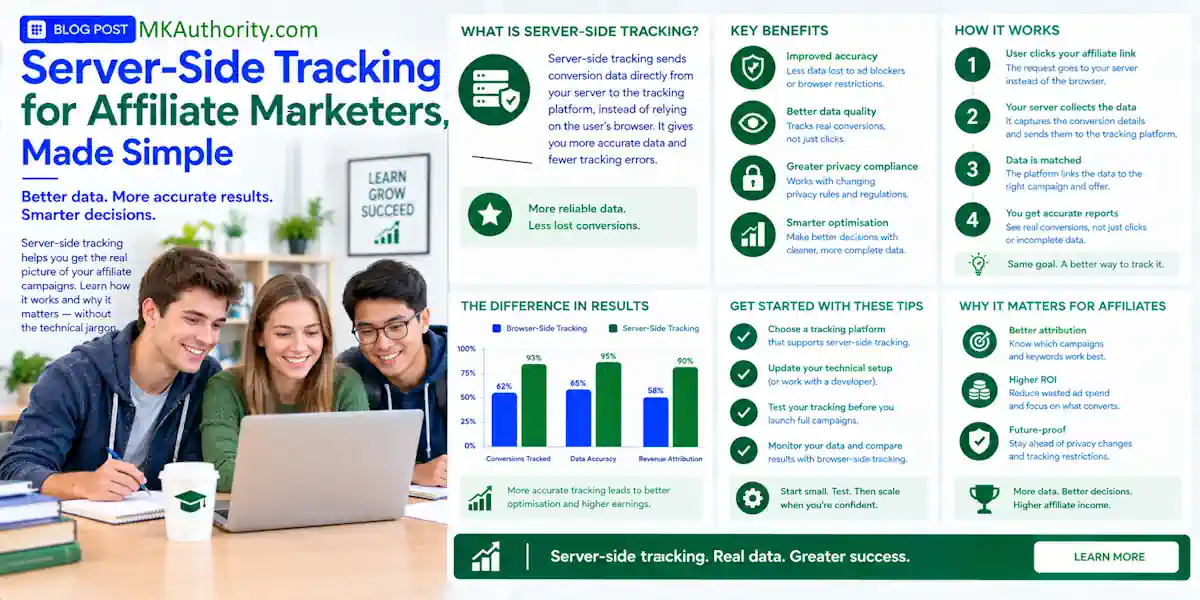

Paid traffic gets expensive fast when incomplete conversion tracking leaves your reports telling only half the story. You might see clicks in one dashboard, leads in another, and sales somewhere else, but you still don’t know which ad put money in your pocket. Server-side tracking gives you a stronger way to use attribution data, connecting an approved sale back to the original click.
Server-side tracking is a data collection method where user interactions on a website or app are sent first to a dedicated cloud server rather than directly to third-party analytics and marketing platforms. It improves measurement, but it isn’t magic, doesn’t override consent or data privacy laws, and won’t fix a weak offer or bypass affiliate rules.
The good news is you don’t need to become a developer to understand the setup or choose the right tools.
Key Takeaways for Affiliate Marketers
- Server-side tracking sends confirmed conversion information between systems, rather than relying only on browser events.
- Your click ID is the digital receipt. If it gets lost in a redirect or form, the sale can’t be matched properly.
- Client-side tracking remains useful for page views, button clicks, and early lead signals, while postbacks confirm approved sales.
- A postback URL can report leads, sales, trials, refunds, reversals, and rebills, if the affiliate network supports those events. It can also support conversion deduplication.
- Consent, opt-outs, disclosure obligations, GDPR compliance, and network rules still govern data collection and sharing. Server-side tracking isn’t a workaround for privacy laws or program terms.
How Server-Side Tracking Works for Affiliate Campaigns

Client-side tracking means the visitor’s browser loads a tracking script, usually a pixel or tag, on your landing page or thank-you page. That script sends event data to Google Analytics, Meta, Google Ads, or another platform.
Server-side tracking adds a middle step. Data first reaches a server container, a controlled environment that receives, checks, and forwards event data. This changes where event handling occurs, rather than guaranteeing faster performance.
Client-Side Tracking vs. Server-Side Tracking
Here is the plain-English difference.
| Tracking method | How the event is sent | Good for | Main weakness |
|---|---|---|---|
| Client-side tracking | The browser loads a pixel or script | Page views, button clicks, basic lead events | Scripts, cookies, and browser settings can interfere |
| Server-side tracking | One server sends data to another server | Confirmed leads, sales, payouts, reversals | Needs clean IDs, careful setup, and supported integrations |
A browser pixel can tell you a visitor reached a page. A server postback can tell you the merchant recorded an approved lead or sale.
Tracking scripts may affect page load time, and browsers or extensions can block them. Server-side processing moves event handling away from the browser, but it still needs accurate data and a working integration.
That is a big difference when you are buying solo ads, running Facebook ads, sending email traffic, or testing a new offer.
What the Server Container Actually Does
Google Tag Manager has a web container for browser tags and a server container for server-side tagging. The web container collects the event, while the server container receives it, checks the details, then routes it to the right destination.
This arrangement is the foundation of server-side tagging. A web container gathers browser events before the server handles the next step.
Think of it like a sorting desk for your data.
You can use it for data collection and tag management across your marketing platforms. Send a clean conversion event to Google Analytics or Matomo, pass an event to Meta’s Conversions API, or record the activity in your tracker. Integrations and required fields vary by tool. A custom domain may also serve as an optional endpoint, depending on your hosting setup.
Google’s own server-side Google Ads setup guide includes a Conversion Linker, a key event, and a server-side Ads conversion tag.
You don’t need to build every part from scratch. You do need to know what data should go in and what should come out.
What Server-Side Tracking Can and Cannot Fix
A lot of people sell this approach like it makes ad blockers disappear and restores every lost sale. That is not how it works.
Client-side tracking relies heavily on browser scripts and pixels. Server-side tracking can reduce that dependence and give you more control over what gets passed to outside platforms. It can also make confirmed affiliate conversions easier to record when a network supports postbacks.
Browser Restrictions Still Create Gaps
Browser restrictions such as Safari’s Intelligent Tracking Prevention can limit identifiers or cookie persistence. First-party cookies and third-party cookies may behave differently across browsers, while ad blockers and script errors can weaken reporting.
A visitor may click your ad, leave the page, return later, or purchase on another device. Server-side tracking is less dependent on that browser behavior, but the original click ID must survive the journey.
If a page builder drops the parameter, a redirect strips it, or the affiliate network rejects it, server-side tracking can’t guess who made the sale. You will still have a missing conversion.
Server-side tracking improves the signal. It does not invent attribution data that was never passed through the funnel.
Postbacks Are Stronger for Confirmed Sales
A postback is a server-to-server message sent after the advertiser, merchant, CRM, or affiliate network validates an event. It does not wait for a thank-you page pixel to load.
That makes postbacks a better fit for approved lead offers, ecommerce sales, subscriptions, call-center funnels, and rebill programs.
For example, a network may send an event like postback?clickid={clickid}&event=sale&sum={payout}. The placeholders, often called macros, are replaced with real values when the sale happens.
The exact macro names vary. One network may use sub1, another may use aff_sub, s2, or clickid. Copy the network’s current instructions exactly. Never assume one platform’s fields work everywhere.
A No-Code Setup You Can Build Step by Step
Treat your first server-side tracking and conversion tracking setup as a small test: one traffic source, one landing page, one offer, one click ID, and one conversion event.
Trying to connect five networks, three trackers, two pixels, and an email platform at once is how a simple campaign turns into a mess.
Step 1: Create and Pass a Unique Click ID
Use an affiliate tracker or tracking platform that creates a unique click ID for every visitor. Your tracking link should pass that ID through to your landing page and then into the affiliate offer URL.
You should also pass readable SubIDs for campaign details. A simple structure might identify the traffic source, campaign, ad, and placement.
For example, sub1 might identify YouTube, sub2 might identify a campaign, and sub3 might identify a button location. This guide to affiliate SubID tracking shows how to separate traffic sources, ads, email links, and content placements without mixing every click into one bucket.
Some tools let you use a custom domain for the tracking endpoint. This is optional and doesn’t replace passing the click ID correctly.
Keep SubIDs focused on campaign data. For safer data collection, don’t put names, email addresses, phone numbers, or order details in URL parameters.
Step 2: Add the Network Postback and Test It
Your network or advertiser normally gives you a postback template, or asks for your postback URL. Paste it into the required field inside your tracker or network dashboard.
If your selected low-code tool routes events through a server container, configure the postback there. Some tracking tools use a proxy server to receive and forward requests. That doesn’t bypass consent requirements or repair a missing identifier.
Before you send paid traffic, ask four simple questions:
- Which parameter receives my click ID?
- What counts as a conversion, lead, sale, trial, or approved sale?
- Can the payout amount change by product or customer?
- Will refunds, reversals, or rebills also be sent back?
Run a test click. Confirm that the click ID appears on the outgoing offer URL. Then ask for a test conversion if the network provides one.
Check the tracker log, the network log, and your conversion report. If the same click ID is visible in all three places, you are on the right track.
Stop Duplicate and Missing Conversions
Browser-based conversion tracking may fire on a thank-you page. A server-side tracking postback may later report the approved sale. Both systems can record the same purchase.
If both events count as separate conversions, your campaign can look profitable when it isn’t.
Use One Conversion ID for Deduplication
A conversion ID is a stable identifier for one event. It might be an order ID, transaction ID, or a unique value created by your tracking platform.
Treat the conversion ID as an event ID, not a click ID. Pass that same ID where your tools support it. Then configure your reporting system to accept the first confirmed event and ignore duplicates.
Don’t use the click ID alone as the conversion ID if one click can produce multiple valid purchases. A subscription offer may have a front-end sale, an upsell, and a rebill. Each event needs its own clear label.
Track events separately, such as:
- Lead submitted
- Lead approved
- Sale pending
- Sale approved
- Refund or reversal
- Rebill or recurring commission
Watch for the Usual Break Points
Most missing affiliate conversions come down to a broken handoff. During data collection, a redirect or form tool may fail to retain the click ID. The merchant may also use the wrong macro in the postback.
Time zones and reporting windows can make numbers look wrong. A network might report a sale after approval, while your ad platform reports a browser event on the day of the click.
Check reports after the network’s approval and refund window has had time to settle. For deeper help, use this guide to reconciling tracker and network reports.
Hosting Choices, Costs, and Real Drawbacks
Managed hosting is usually the easier route for non-developers, but it’s a convenience choice, not a guarantee of better attribution. Stape is one popular option for hosting a Google Tag Manager server container and supporting server-side tagging without setting up cloud infrastructure yourself. Features and supported integrations can change, so check what your provider includes.
Its published plans include a free tier for up to 10,000 monthly requests. A request can include more than conversions, such as tracking hits and script loads, so watch usage before choosing a paid plan. Check Stape’s current pricing before you commit, because limits and prices can change.
Self-hosting through Google Cloud Run gives you more control, but it also brings billing, domain routing, security, updates, and debugging into your life. A custom domain may require DNS, HTTPS, and ongoing maintenance, depending on your setup. That may be fine for a technical business. It is not always the best first move for a solo affiliate.
The biggest server-side tracking drawbacks are not glamorous:
- Setup takes care and testing. A wrong field in the server container can destroy attribution.
- You may still lose data when consent is denied or IDs are stripped.
- Tool dashboards use different names, time zones, and attribution rules.
- Network policies can limit what you may pass, store, or use for optimization.
Consent, Privacy, and Affiliate Rules Still Matter
Server-side tracking changes how data is routed and controlled. It doesn’t change your legal basis for collection or your data privacy responsibilities.
GDPR compliance, ePrivacy rules, CCPA-style laws, and affiliate-network agreements can apply to click IDs, cookies, IP addresses, email data, and conversion records. A click ID may look anonymous, but it can still be personal data if it can be linked to a person or device.
Use a clear consent banner where required. Honor opt-outs and limit data collection to what you need. Keep data only as long as necessary, and use HTTPS for your pages, redirects, postbacks, and APIs.
Sending an event to a destination such as a Conversions API still requires appropriate consent and a valid data-sharing basis where applicable. An API doesn’t bypass consent requirements.
Also check your affiliate program rules before passing identifiers to ad platforms. Some programs restrict brand bidding, retargeting, email use, coupon promotion, or how customer information can be handled.
Your disclosures matter too. If you recommend an affiliate product on a review page, email, video, or social post, make the affiliate relationship clear. Accurate tracking should never come at the expense of trust.
Frequently Asked Questions
Do I need server-side tracking if I am a beginner?
Not always. If you are sending free traffic to a simple affiliate offer, clean SubIDs and network reports may be enough at first.
If you are buying traffic, testing offers, running lead funnels, or need to know which ads generate approved sales, server-side tracking becomes much more useful.
Can server-side tracking bypass ad blockers?
No. It can reduce reliance on browser-side scripts, but it doesn’t bypass consent choices, browser restrictions, blocked redirects, or missing click IDs.
Use it to improve measurement and control, not as a promise of perfect data.
Should I use pixels and postbacks together?
Often, yes. Use client-side tracking and browser pixels for on-site behavior, audience building, and early lead signals. Use server postbacks to confirm conversion events that affect your actual commissions.
A server-receiving destination, such as the Conversions API, may also support this approach. Available features and deduplication behavior depend on the destination.
Set up deduplication before both systems start reporting the same sale.
Better Data Makes Better Affiliate Decisions
Server-side tracking isn’t about making your reports look fancy. It is about knowing which clicks turn into approved, payable results.
Start with one clean click ID, one tested postback, and conversion tracking for a campaign you can verify from click to conversion. Clean tracking beats guesswork, especially when real ad spend is on the line.